Revival kit
For a drained or quiet token whose community wants a second run.
On this page
Deploying soonSet it up now without A reward token made in the app, for Swap Reward Mint and Floor bid, which are deploying soon. Runs on live blocks. Floor bid is deploying soon.
Crowns, points and a public safety reserve give a quiet token a reason to trade again.
Why it is different. A relaunch that shows its safety net in public before asking anyone back.
The pools
Three pools · liquidity locked a week
- ETHtick spacing 60
Crown pool
- Live:Dynamic fees
- Live:Auto Burn
- Live:LP Rewards
- Live:Arb recapture
- Live:King of the Pool
- HOOKRtick spacing 200
Sell tax to the team's treasury
- Live:LP Rewards
- Live:Arb recapture
- Live:Tax + Conversionadvisory
How the pools work together
- The HOOKR sell tax pays the team's treasury, which funds the pools' Recovery reserve in public view; the reserve pays LPs or traders back after a reviewed incident.
- Floor bid keeps a standing bid under the price.
- Milestone Trigger would step rewards up as the revival hits its milestones. Proposed
Beside the pools and at launch
- Live:Recovery reserve
- Deploying soon:Floor bidDeploying soon
- Live:Limit orders
- Live:Liquidity lock
Proposed connectors
- Proposed:Family Pinger
- Proposed:Milestone Trigger + Phase Gate
Walkthrough
Every section of the launch floor this combo uses, in order, with what to check, select and fill in each. The screenshots use WTH 0xb8fa8010833463aac5595b55b9045479239eff79 (an example; HOOKR is one of this family's quotes, so WTH stands in for the quiet token) as the token.
Full walkthrough: Launch 1: three revival pools on WTH
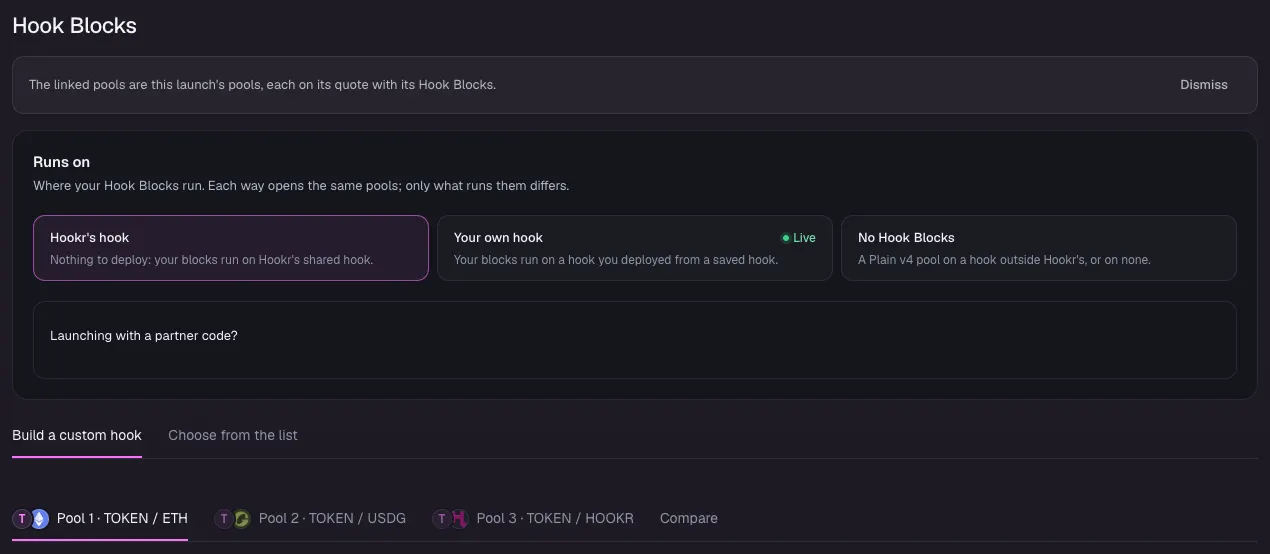
Open the family
- Open the launch page on this family.
- Check that Hook Blocks says The linked pools are this launch's pools, with Pool 1 · TOKEN / ETH, Pool 2 · TOKEN / USDG and Pool 3 · TOKEN / HOOKR.
- Leave Runs on at Hookr's hook.
Choose the token
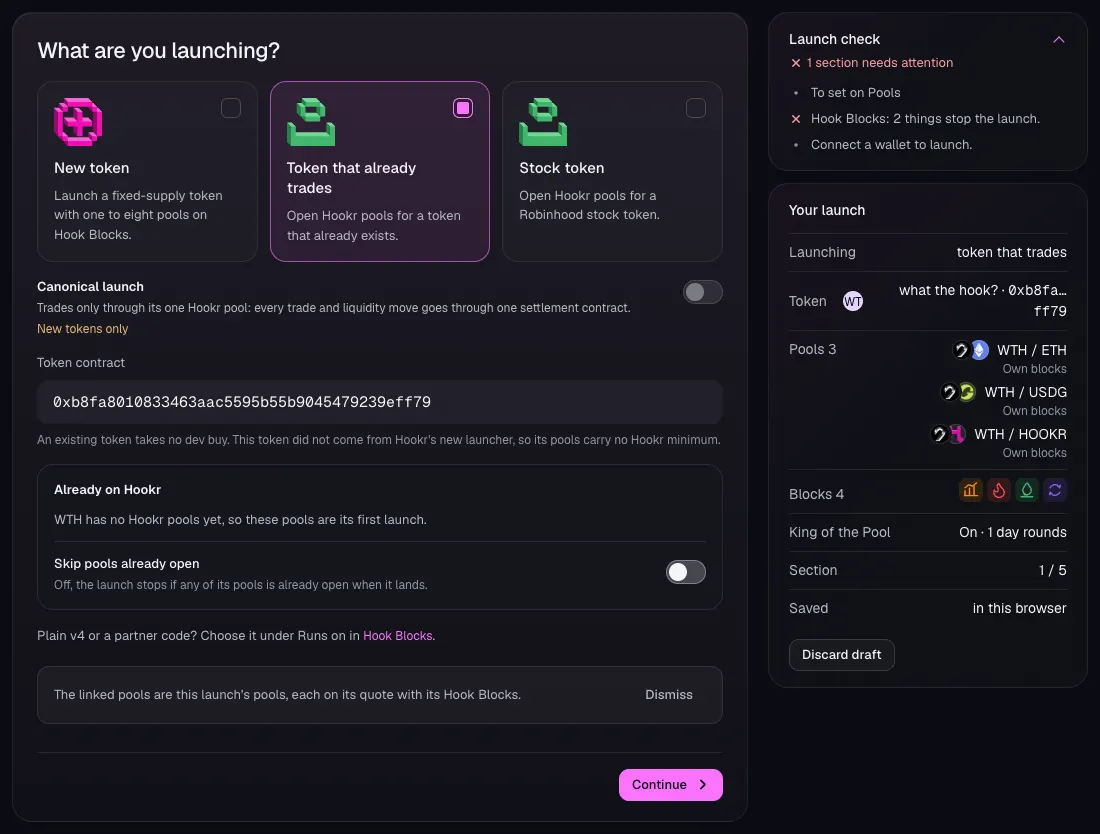
- Click 1 Token and choose Token that already trades.
- Paste the token's address in Token contract. This walkthrough uses WTH, 0xb8fa8010833463aac5595b55b9045479239eff79, as an example.
- Check Already on Hookr. For WTH it says these pools are its first launch. Leave Skip pools already open off.
- Click Continue.
Price the ETH pool
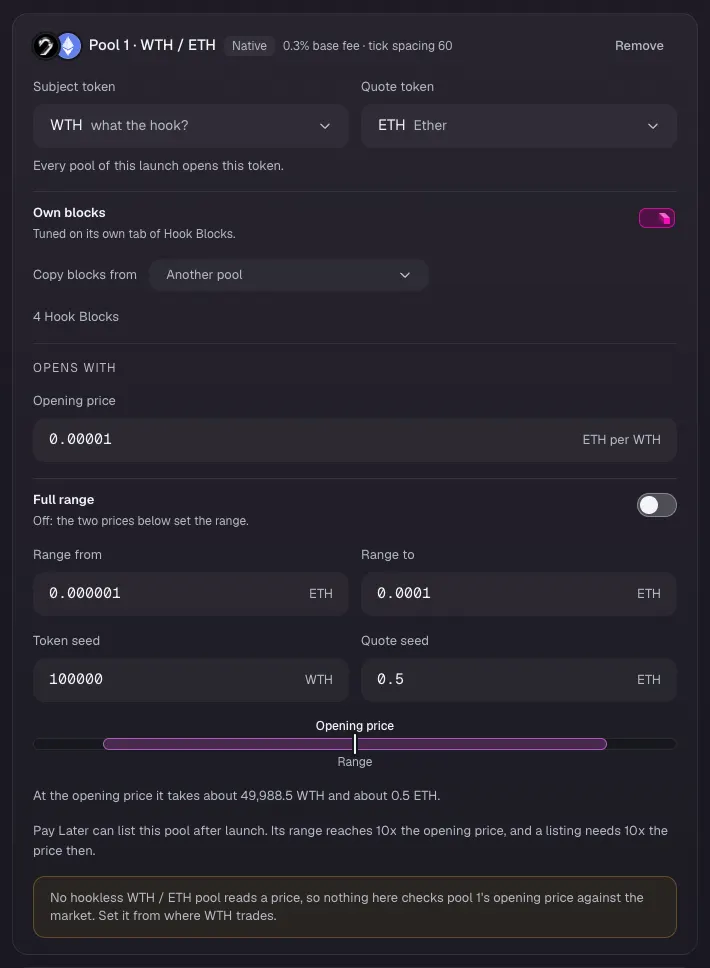
- On Pool 1 · WTH / ETH, check it reads tick spacing 60 and 4 Hook Blocks.
- Type the price your token trades at in Opening price. This walkthrough uses 0.00001 ETH per WTH.
- Leave Full range off. Type 0.000001 in Range from and 0.0001 in Range to.
- Type 100000 in Token seed and 0.5 in Quote seed. These are example amounts.
Price the USDG pool
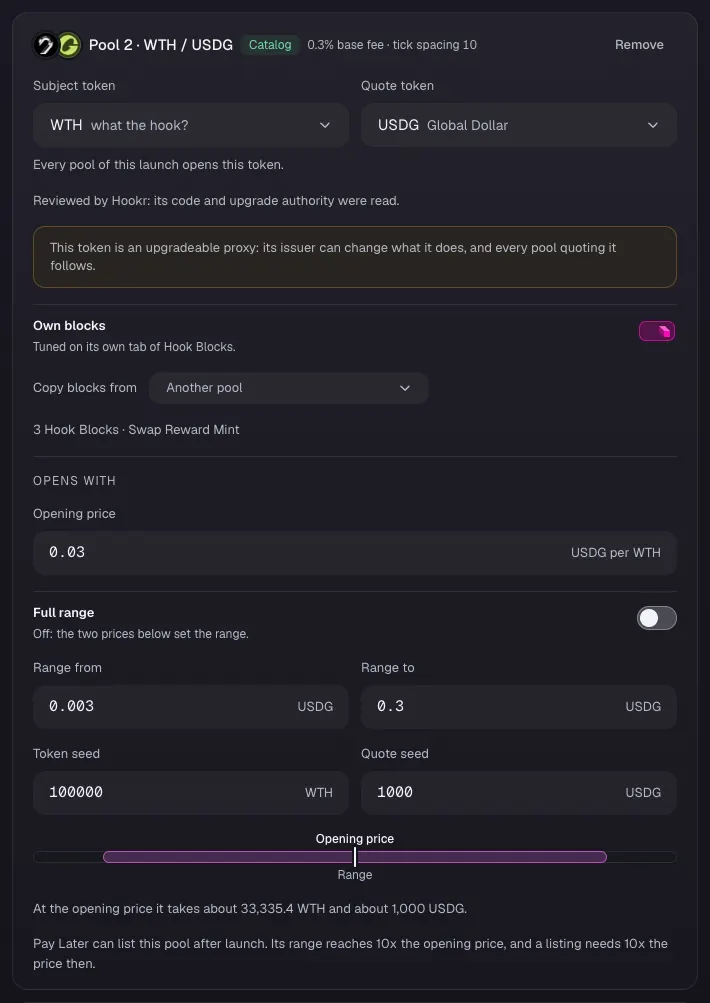
- On Pool 2 · WTH / USDG, check it reads tick spacing 10 and 3 Hook Blocks · Swap Reward Mint.
- Type 0.03 in Opening price, 0.003 in Range from and 0.3 in Range to.
- Type 100000 in Token seed and 1000 in Quote seed. These are example values.
Price the HOOKR pool
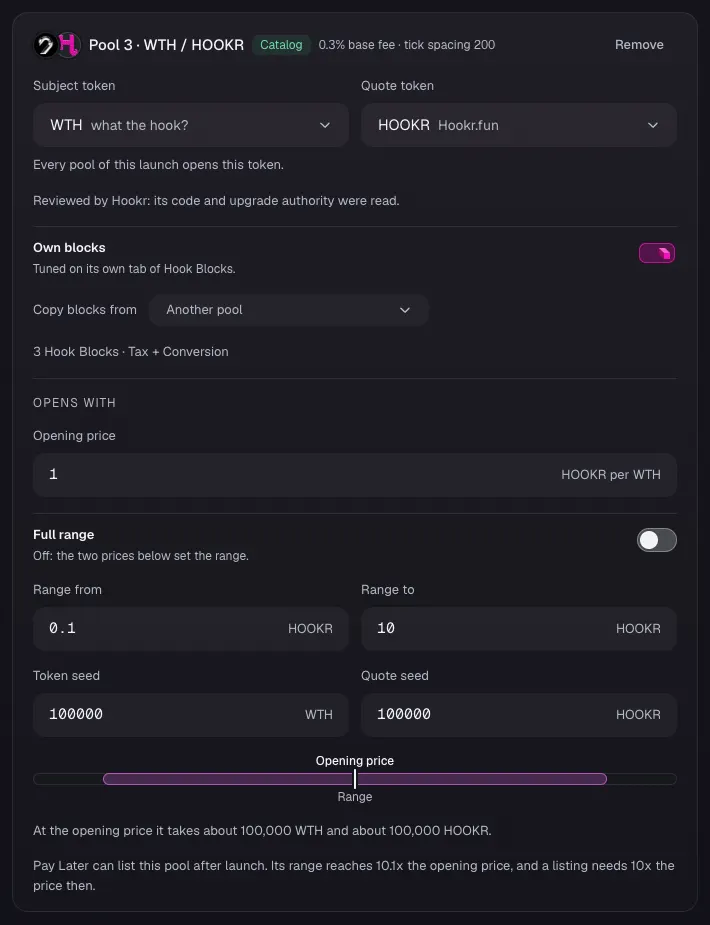
- On Pool 3 · WTH / HOOKR, check it reads tick spacing 200 and 3 Hook Blocks · Tax + Conversion.
- Type 1 in Opening price, 0.1 in Range from and 10 in Range to.
- Type 100000 in Token seed and 100000 in Quote seed. These are example values.
- Leave Opening price check off and click Continue.
Crown pool blocks
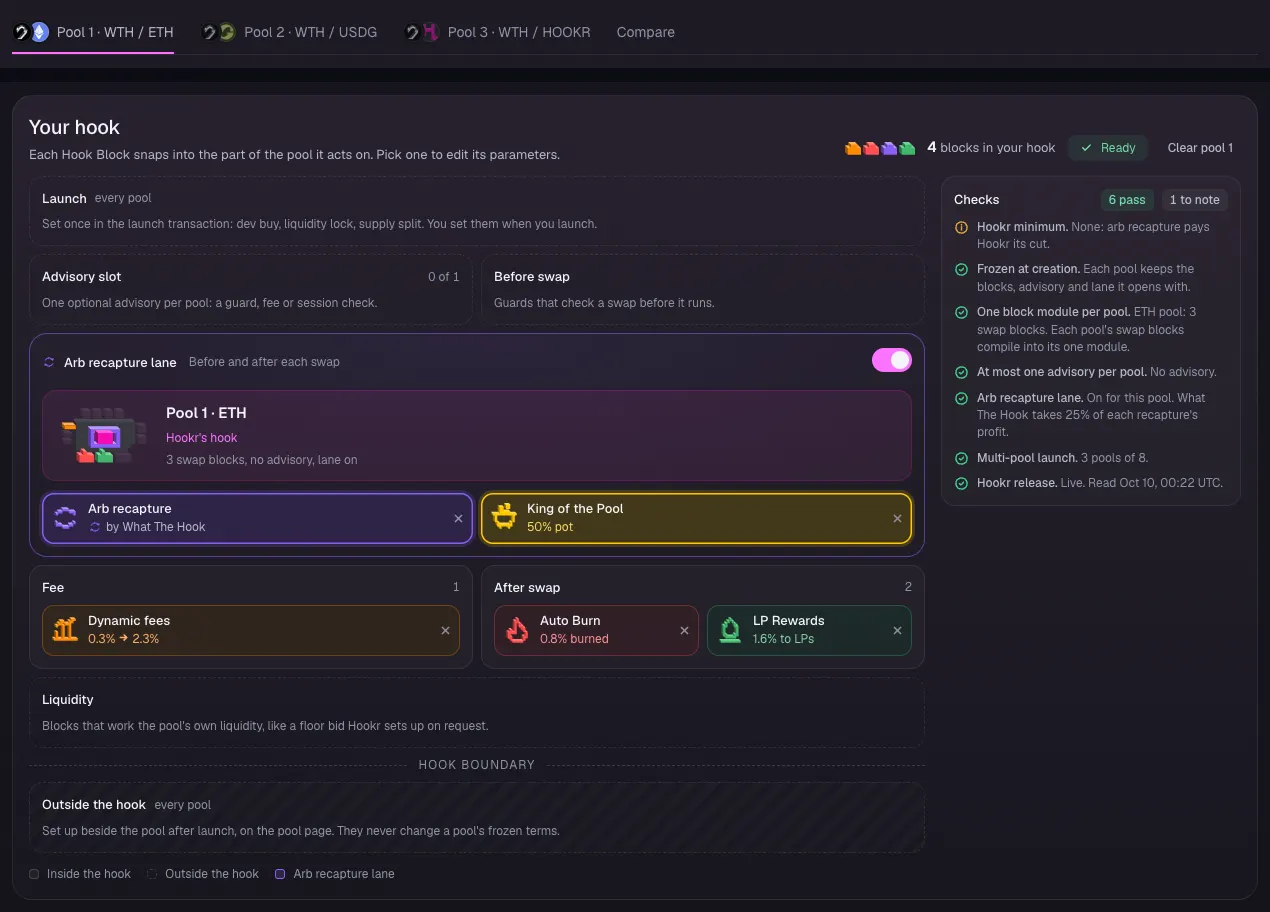
- Click the Pool 1 · WTH / ETH tab.
- If King of the Pool reads 25% pot and Checks lists Pot share and Prize ceiling to fix, click the × on King of the Pool, then switch King of the Pool back on in its card. It then reads 50% pot.
- Check Your hook shows Dynamic fees, Arb recapture, King of the Pool at 50% pot, Auto Burn and LP Rewards, with the Advisory slot at 0 of 1.
King of the Pool
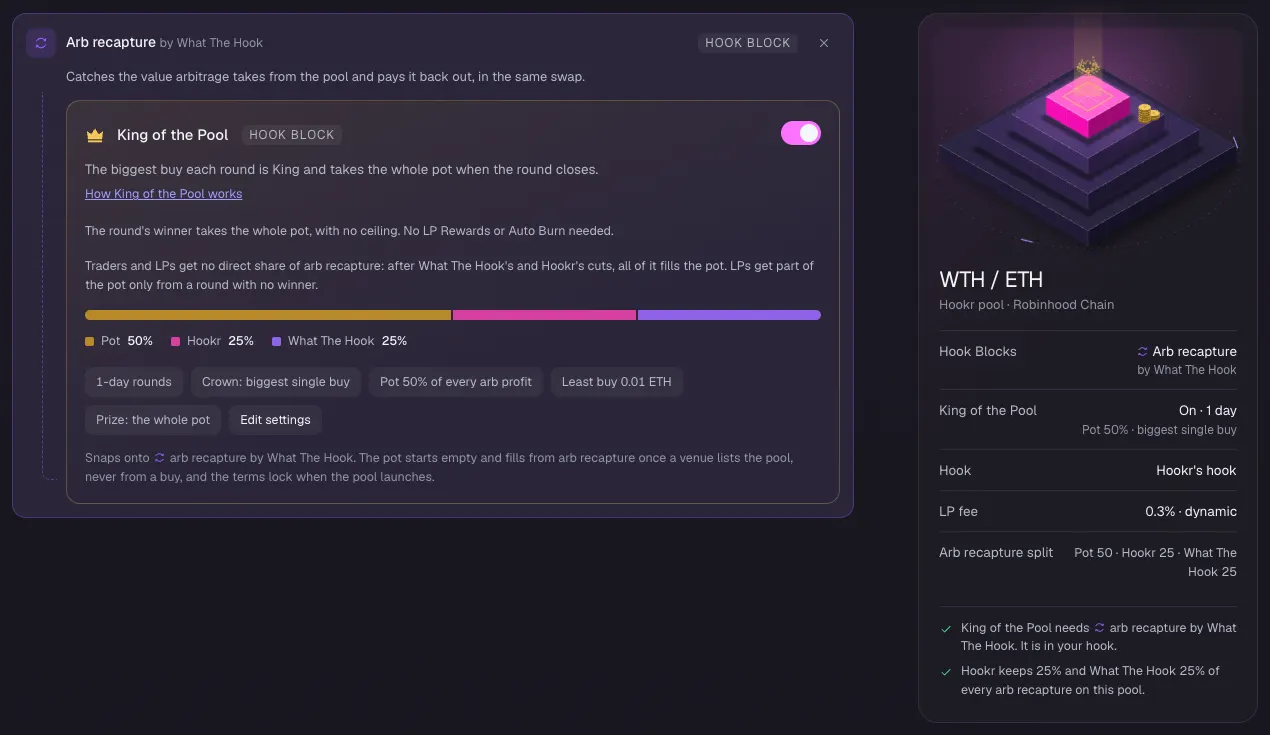
- Check King of the Pool is switched on: 1-day rounds, Pot 50% of every arb profit, Least buy 0.01 ETH, Prize: the whole pot.
- Check Arb recapture split reads Pot 50 · Hookr 25 · What The Hook 25.
Points pool blocks
- Click the Pool 2 · WTH / USDG tab.
- Check Your hook shows Arb recapture and LP Rewards, with Swap Reward Mint in the Advisory slot at 1 of 1.
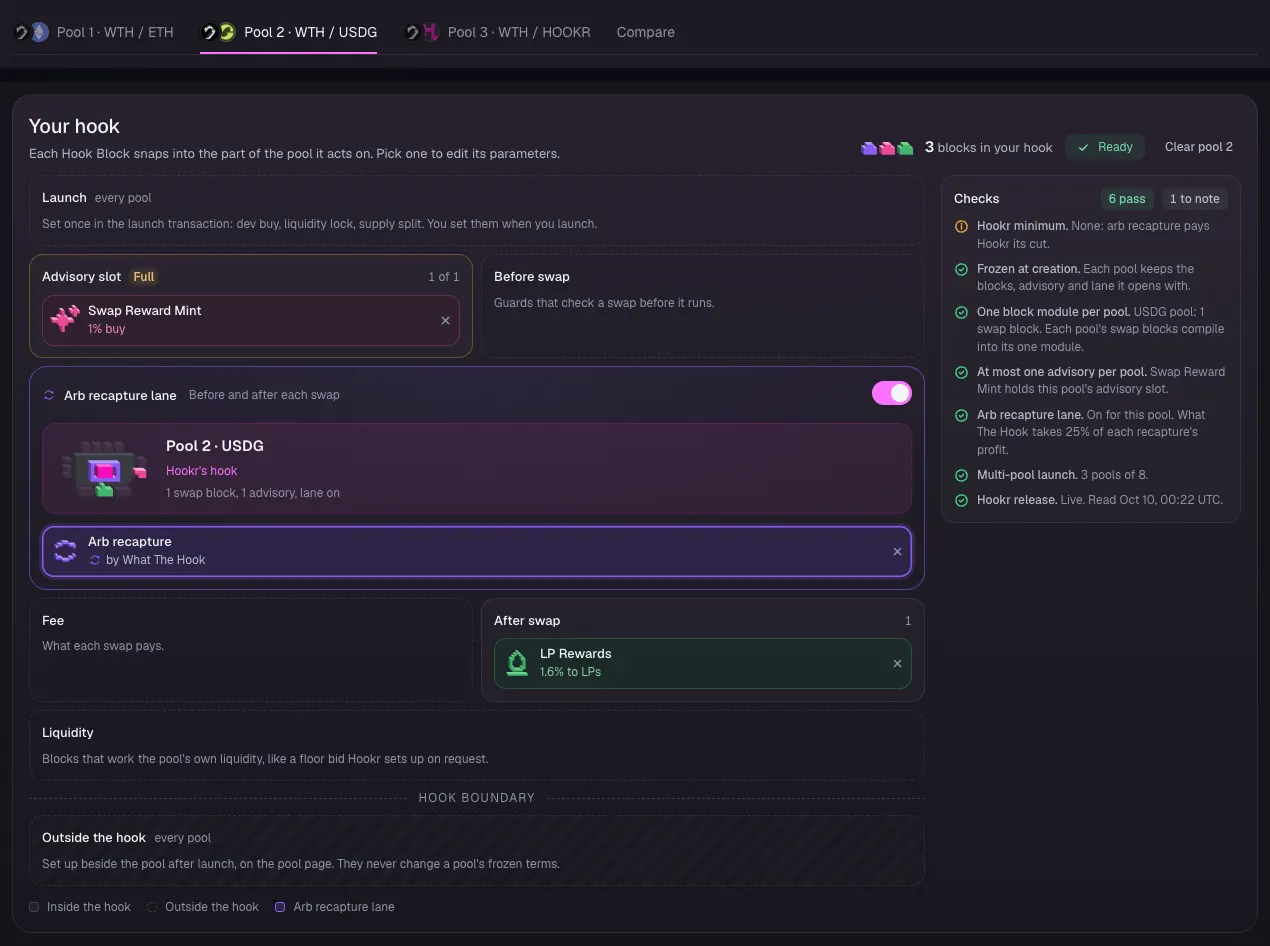
Name the reward token
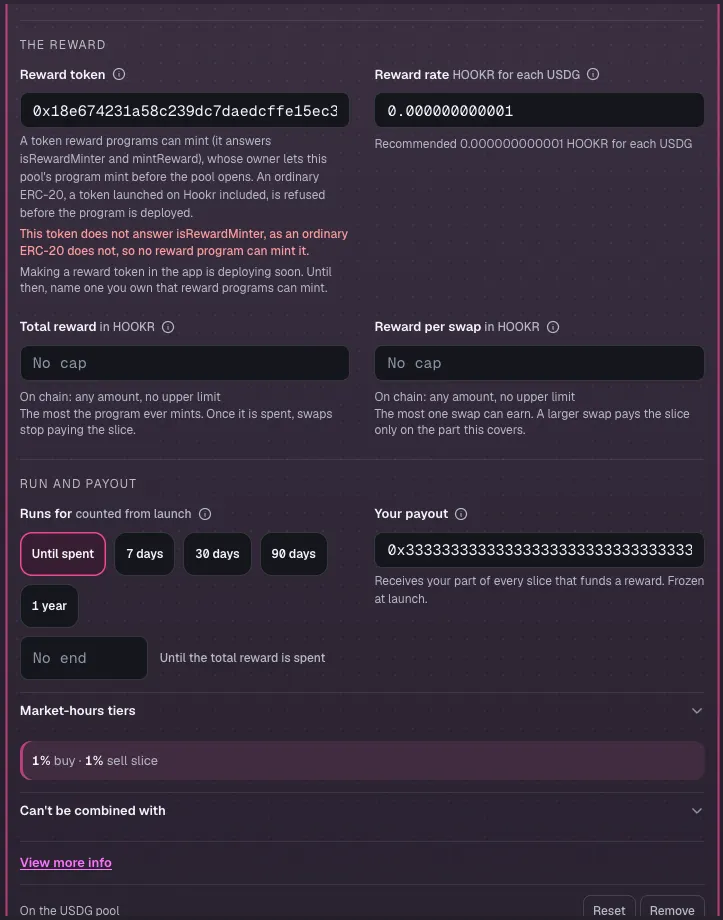
- Click Swap Reward Mint on the board.
- In Reward token, paste the address of a reward token you own that reward programs can mint.
- An ordinary token is refused. With HOOKR the builder says This token does not answer isRewardMinter, so no reward program can mint it. Making a reward token in the app is deploying soon.
- In Your payout, paste the team's wallet address. This walkthrough uses 0x3333…3333 as an example.
- Without a reward token, click Remove on Swap Reward Mint. The USDG pool then opens with LP Rewards and Arb recapture only.
Treasury pool blocks
- Click the Pool 3 · WTH / HOOKR tab.
- Check Your hook shows Arb recapture and LP Rewards, with Tax + Conversion in the Advisory slot at 1 of 1.
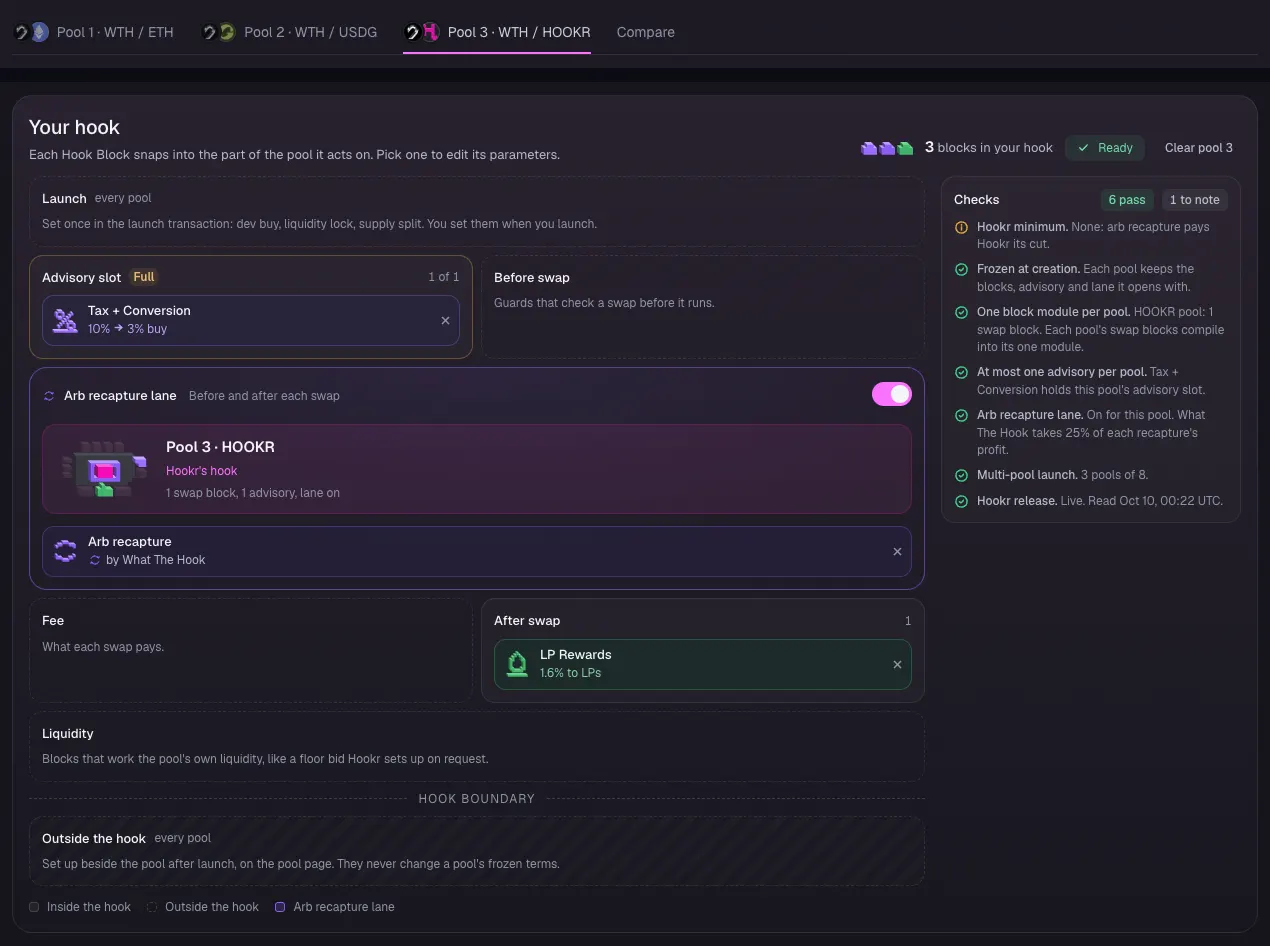
Set the treasury
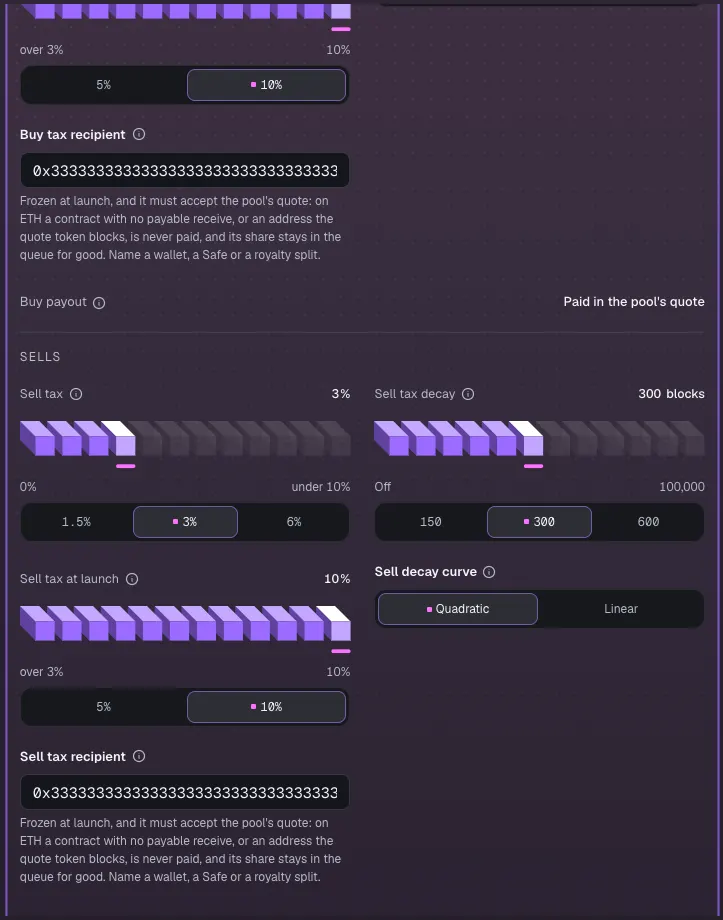
- Click Tax + Conversion on the board.
- Leave Buy tax and Sell tax at 3%, starting at 10% and falling over 300 blocks.
- In Buy tax recipient and Sell tax recipient, paste the team's treasury address. This walkthrough uses 0x3333…3333 as an example.
- Click Continue.
Lock the liquidity
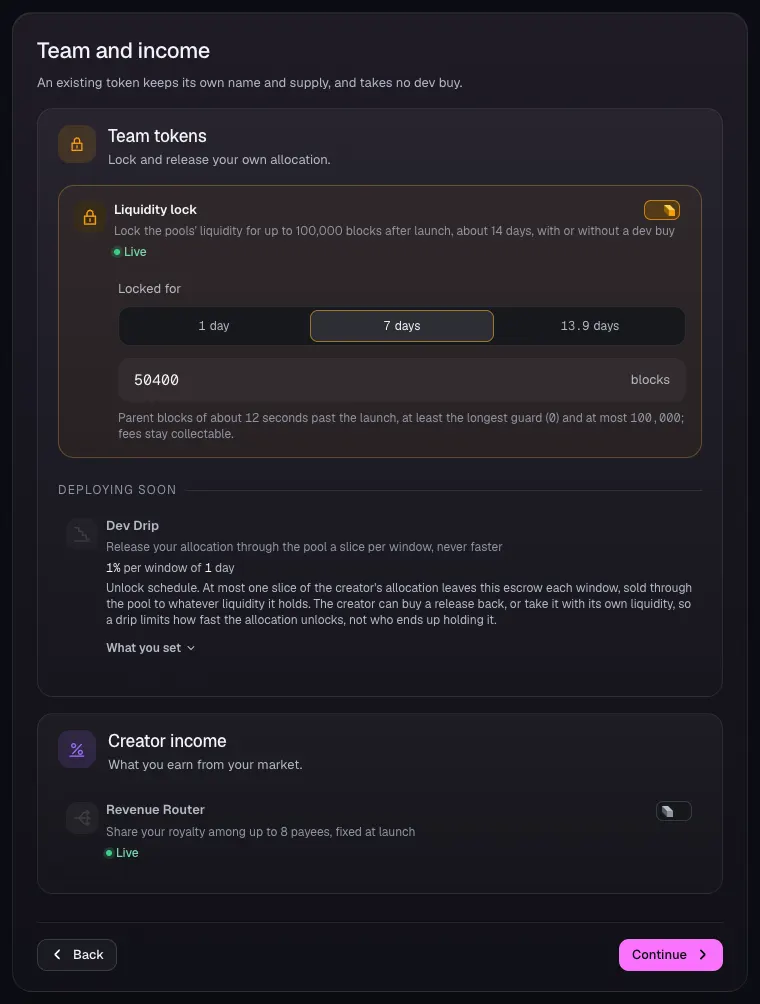
- Check Liquidity lock is on with Locked for at 7 days, 50400 blocks.
- Leave Revenue Router off and click Continue.
Review the pools
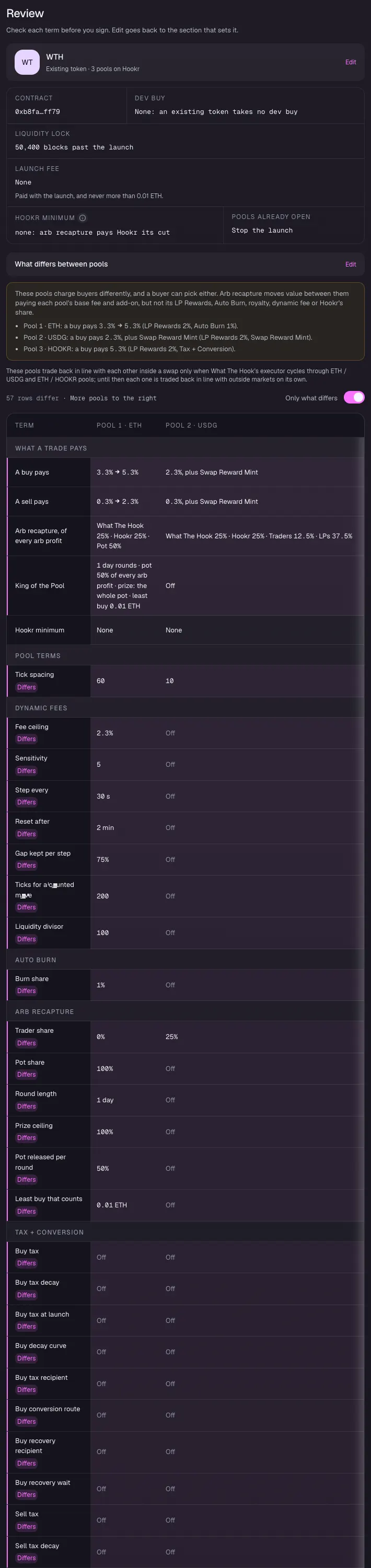
- Check LIQUIDITY LOCK reads 50,400 blocks past the launch.
- Under What differs between pools, check tick spacing 60, 10 and 200, King of the Pool on the ETH pool only, Swap Reward Mint on the USDG pool and Tax + Conversion on the HOOKR pool.
Floor bid and Recovery reserve
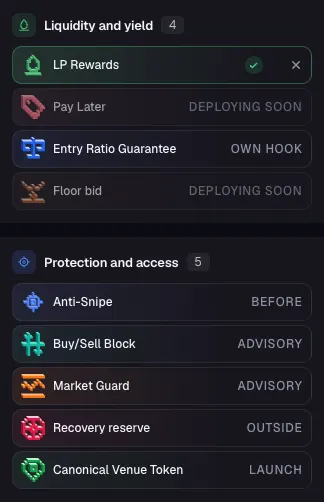
- Check Floor bid under Liquidity and yield in Every Hook Block. It reads Deploying soon, so the standing bid waits for it.
- Recovery reserve reads Outside: you set it up beside the pool after launch.
Sign and set up after launch
- Stop at Review when it says Connect a wallet to launch. Connecting a wallet and signing is yours to do.
- With a reward token, Review first deploys the USDG pool's reward program, and the reward token's owner lets it mint.
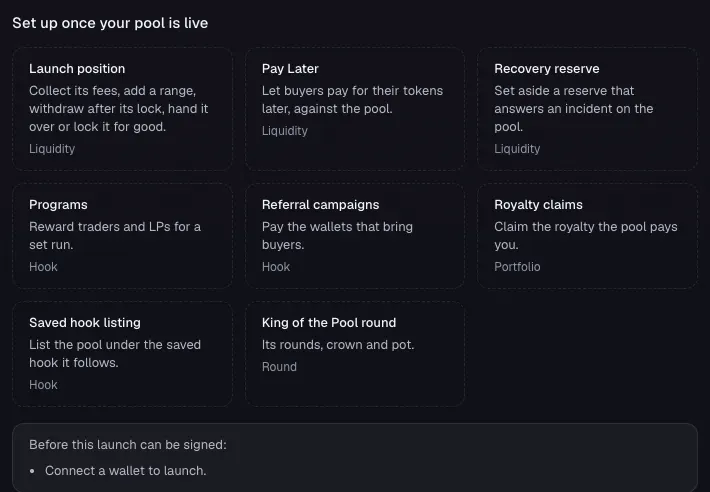
- After launch, open Recovery reserve from Set up once your pool is live and fund it from the treasury in public view.