Session pools
For a community whose holders hold Robinhood stock tokens.
On this page
LiveEverything outside the proposed connectors is live. Runs on live blocks. Market-hours fee is admitted with a 5% cap.
A token quoted against six stock tokens, ETH and USDG. Its stock pools add nothing on top of their LP fee in market hours and up to 1% more while the market is shut.
Why it is different. Six of its eight pools price the hours Wall Street is closed.
The pools
Eight pools · split 30/20/10/10/10/10/5/5
- ETHtick spacing 60
Crown pool
- Live:Anti-Snipe
- Live:Dynamic fees
- Live:Auto Burn
- Live:LP Rewards
- Live:Arb recapture
- Live:King of the Pool
- USDGtick spacing 10
Desk: a capped surcharge
- Live:Dynamic fees
- Live:LP Rewards
- Live:Arb recapture
- Live:Managed feeadvisory
- NVDAtick spacing 30
0 · 0.2 · 0.2 · 0.4 · 1%
- Live:Dynamic fees
- Live:LP Rewards
- Live:Arb recapture
- Live:Market-hours feeadvisory
- TSLAtick spacing 30
0 · 0.2 · 0.2 · 0.4 · 1%
- Live:Dynamic fees
- Live:LP Rewards
- Live:Arb recapture
- Live:Market-hours feeadvisory
- SPYtick spacing 30
0 · 0.2 · 0.2 · 0.4 · 1%
- Live:Dynamic fees
- Live:LP Rewards
- Live:Arb recapture
- Live:Market-hours feeadvisory
- QQQtick spacing 30
0 · 0.2 · 0.2 · 0.4 · 1%
- Live:Dynamic fees
- Live:LP Rewards
- Live:Arb recapture
- Live:Market-hours feeadvisory
- AAPLtick spacing 30
0 · 0.2 · 0.2 · 0.4 · 1%
- Live:Dynamic fees
- Live:LP Rewards
- Live:Arb recapture
- Live:Market-hours feeadvisory
- GLDtick spacing 30
0 · 0.2 · 0.2 · 0.4 · 1%
- Live:Dynamic fees
- Live:LP Rewards
- Live:Arb recapture
- Live:Market-hours feeadvisory
How the pools work together
- Market-hours fee adds nothing on top of each stock pool's LP fee in regular hours, then 0.2% before the open and after the close, 0.4% overnight and 1% on closed days, all to that pool's LPs.
- Family Pulse would raise sells on all eight pools if the family sells hard at the Monday open. Proposed
Beside the pools and at launch
- Live:Supply split
- Live:Opening price check
- Live:Limit orders
Proposed connectors
- Proposed:Family Ledger
- Proposed:Family Pulse
Walkthrough
Every section of the launch floor this combo uses, in order, with what to check, select and fill in each.
Full walkthrough: Launch 1: eight pools (EXMPL shown)
Open the launch page and name the token
- Open hookr.fun/launch. This family has no link: its eight pools are too long for one, so you build it by hand.
- If an older draft opens, click Discard draft. A new draft starts with one TOKEN / ETH pool on Anti-Snipe, Dynamic fees, Auto Burn, LP Rewards and Arb recapture, with King of the Pool on.
- Keep New token selected.
- Type the token's name in Name and its ticker in Ticker. The example uses Example and EXMPL.
- Leave Supply at 1,000,000,000.
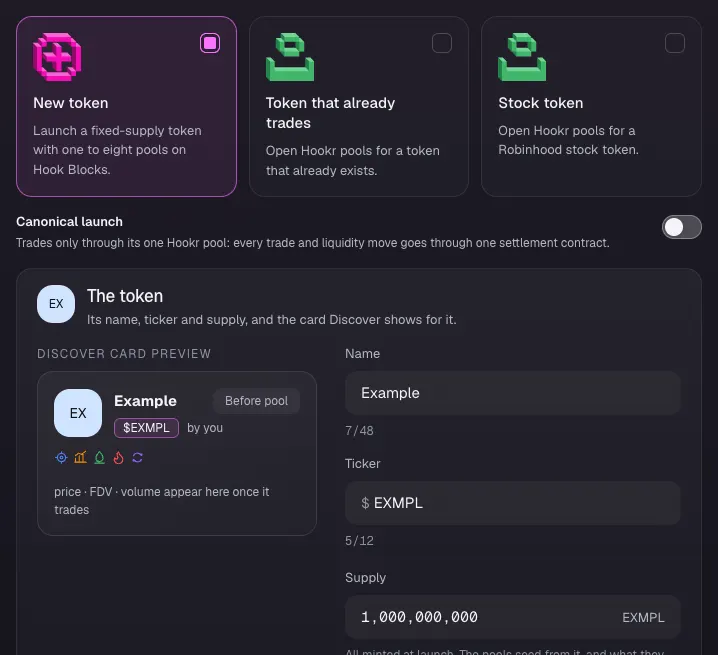
Add seven pools and pick their quotes
- Click 2 Pools.
- Click Add another pool seven times. Each new pool takes a copy of pool 1's blocks and opens on the next quote: USDG, HOOKR, NVDA, SPY, QQQ, AAPL and TSLA.
- Open Quote token on pool 8 and pick GLD.
- Open Quote token on pool 4 and pick TSLA, then on pool 3 pick NVDA. A quote another pool holds is greyed out as Pool N quotes it, so change them in this order.
- Check the eight pools read ETH, USDG, NVDA, TSLA, SPY, QQQ, AAPL and GLD.
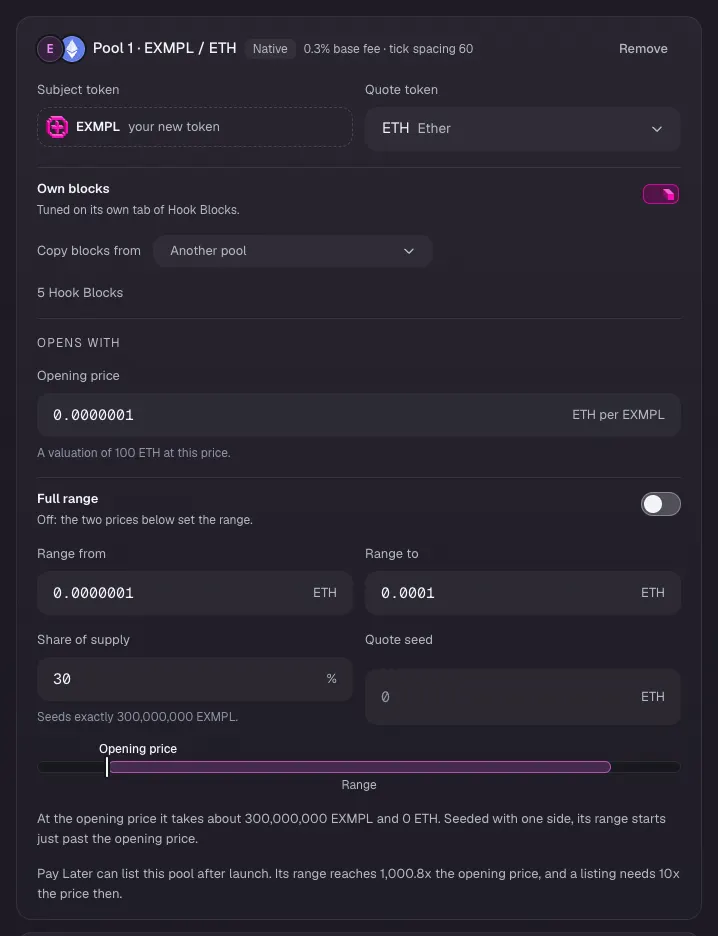
Set pool 1, EXMPL / ETH
- On Pool 1 · EXMPL / ETH, type the Opening price in ETH per EXMPL. The example uses 0.0000001.
- Leave Full range off and type Range from and Range to. The example uses 0.0000001 and 0.0001.
- Type 30 in Share of supply.
- Leave Quote seed at 0, so the pool opens with EXMPL only.
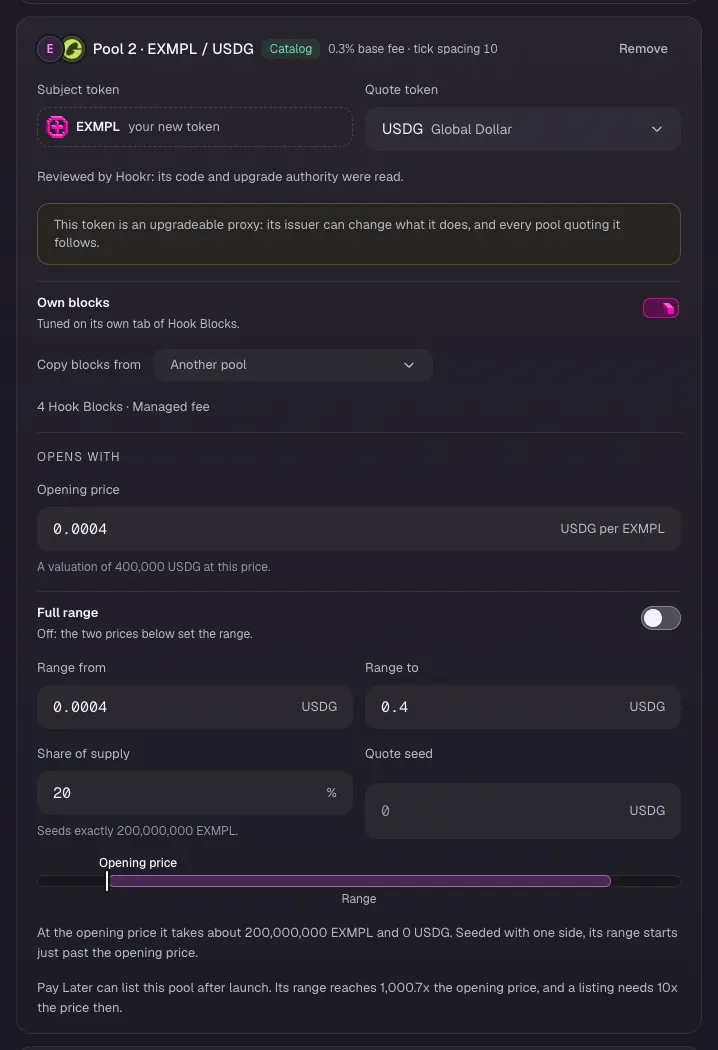
Set pool 2, EXMPL / USDG
- On Pool 2 · EXMPL / USDG, type the Opening price in USDG per EXMPL. The example uses 0.0004.
- Type Range from and Range to. The example uses 0.0004 and 0.4.
- Type 20 in Share of supply.
- Its tick spacing becomes 10 under Hook Blocks (step 9).
Set the six stock pools
- On each stock pool, type the Opening price in that stock token per EXMPL, and Range from and Range to. The example uses 0.000002, 0.000002 and 0.002 on all six: use each stock's real price.
- Type Share of supply: 10 on NVDA, TSLA, SPY and QQQ, and 5 on AAPL and GLD.
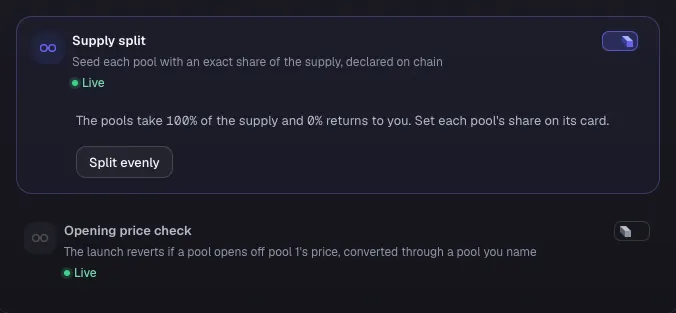
Turn on the supply split
- Under Pools and trading, turn on Supply split.
- Check that it reads: The pools take 100% of the supply and 0% returns to you.
- Opening price check is optional: turn it on, set Tolerance and pick each pool's reference pool. The example leaves it off.
Keep pool 1's blocks
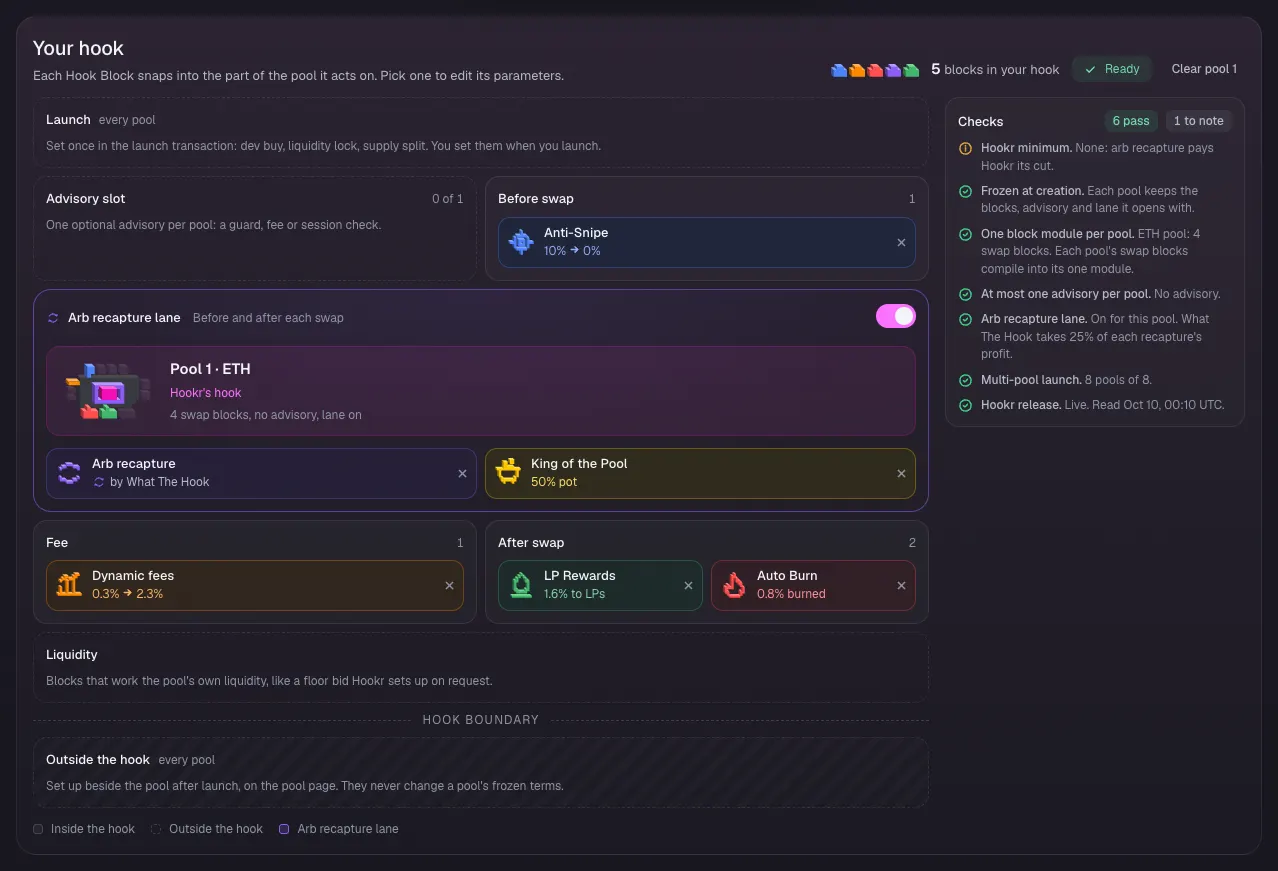
- Click 3 Hook Blocks, then the Pool 1 · EXMPL / ETH tab.
- Check that Your hook shows Anti-Snipe, Dynamic fees, Auto Burn, LP Rewards and Arb recapture with King of the Pool, and the Advisory slot reads 0 of 1.
Make pool 2 the desk
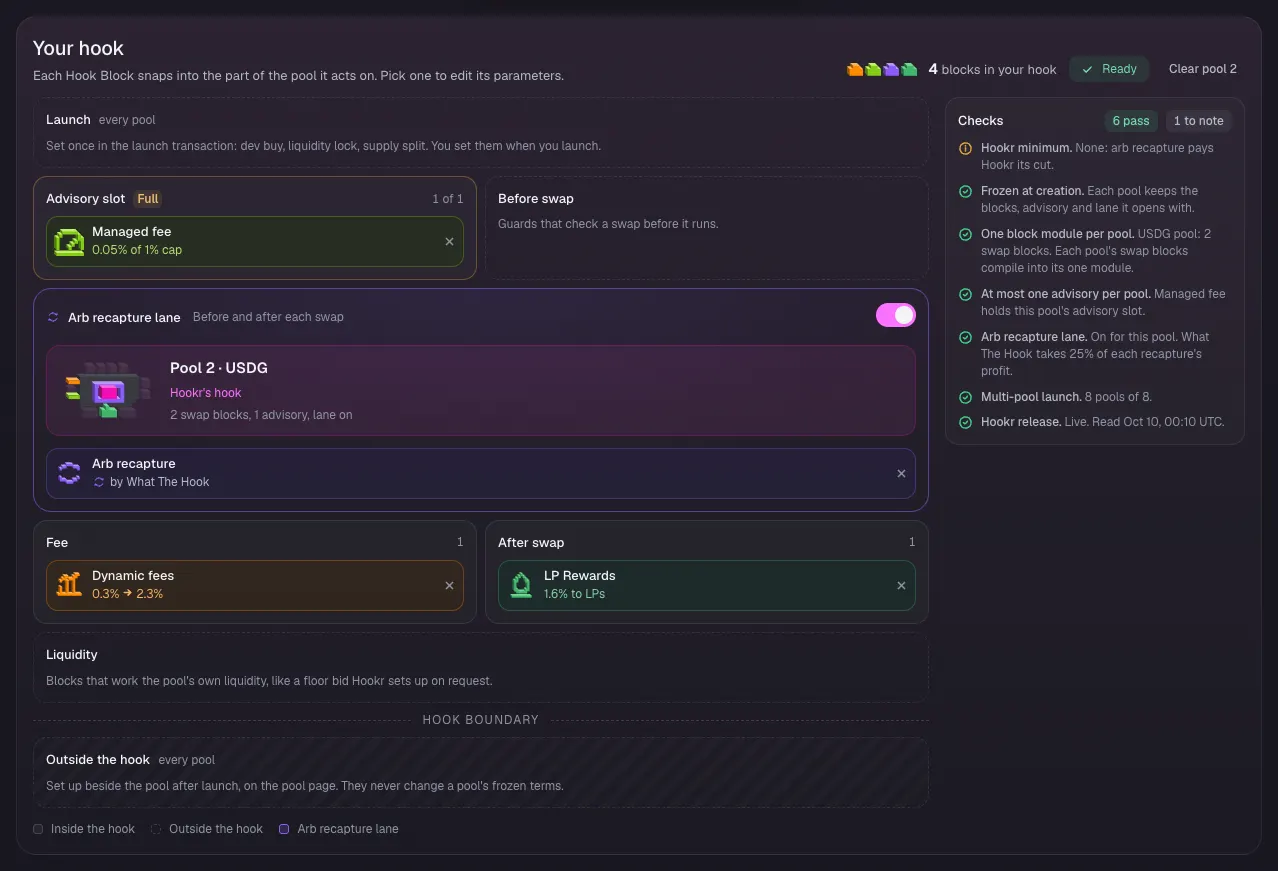
- Click the Pool 2 · EXMPL / USDG tab.
- Remove Anti-Snipe and Auto Burn with their × buttons.
- Turn off King of the Pool.
- Under Every Hook Block, click Managed fee to put it in the Advisory slot.
- Check that Your hook shows Dynamic fees, LP Rewards, Arb recapture and Managed fee 0.05% of 1% cap, Advisory slot Full, 1 of 1.
Set pool 2's tick spacing to 10
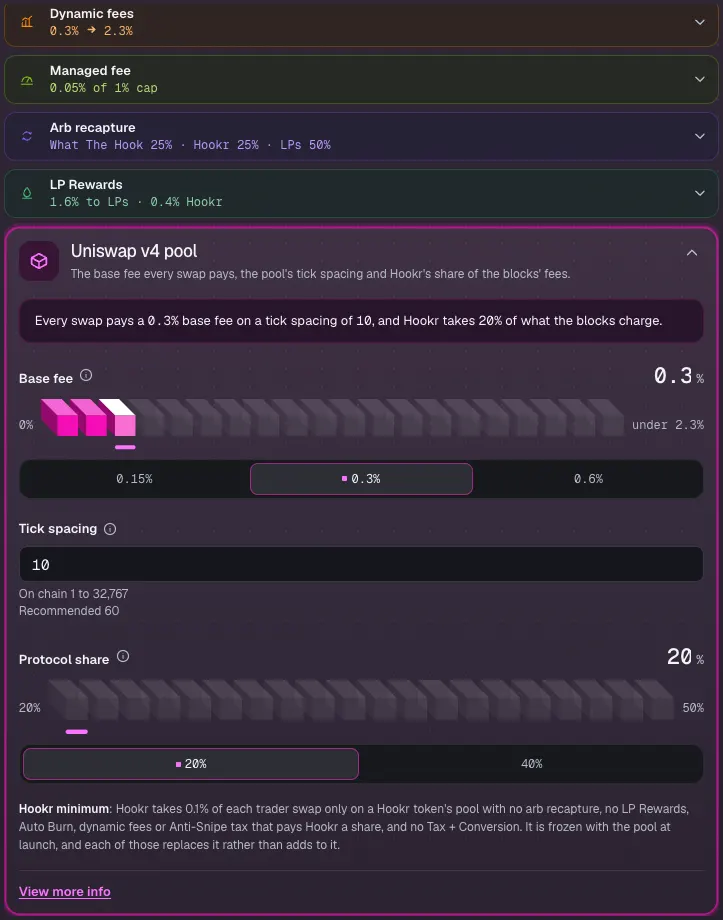
- Click Pool terms in the block list.
- Type 10 in Tick spacing. The line above reads: Every swap pays a 0.3% base fee on a tick spacing of 10.
Make pool 3 a session pool
- Click the Pool 3 · EXMPL / NVDA tab.
- Remove Anti-Snipe and Auto Burn, and turn off King of the Pool.
- Under Every Hook Block, click Market-hours fee to put it in the Advisory slot. It is offered on a stock token pool only.
Set the market-hours tiers
- In Market-hours fee, leave Regular hours at 0%, Pre-market and After hours at 0.2%, and Overnight at 0.4%.
- Type 1 in Market closed. It starts at 0.6%.
- Leave Ramp into the open at 30 min and Ramp into the close at 15 min.
Set pool 3's tick spacing to 30
- Click Pool terms in the block list and type 30 in Tick spacing.
Copy pool 3's blocks to pools 4 to 8
- Click the Pool 4 · EXMPL / TSLA tab, open Copy blocks from and pick Pool 3 · NVDA. The note reads: Pool 4 now has pool 3's blocks.
- Do the same on the SPY, QQQ, AAPL and GLD tabs.
- The copy carries the Market-hours fee tiers and tick spacing 30.
Check each stock pool's blocks
- On each of the six stock pool tabs, check that Your hook shows Dynamic fees, LP Rewards and Arb recapture, with Market-hours fee in the Advisory slot (Full, 1 of 1) and no King of the Pool.
Leave Team and income as it is
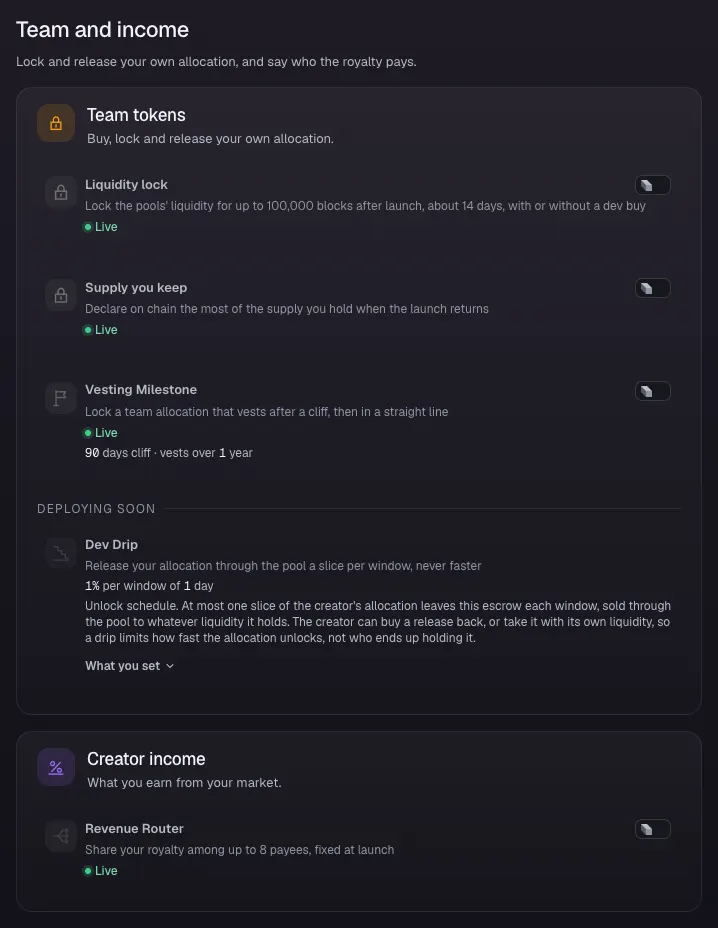
- Click 4 Team and income.
- Leave Liquidity lock, Supply you keep, Vesting Milestone and Revenue Router off.
Compare the pools on Review
- Click 5 Review.
- Check Supply split: pool 1 30% · pool 2 20% · pools 3 to 6 10% · pools 7 and 8 5%.
- Under What differs between pools, check King of the Pool on pool 1 only, Managed fee on pool 2, Market-hours fee on the six stock pools, and tick spacing 60, 10 and 30.
Clear Fix before launching, then sign
- Fix every line under Fix before launching.
- Click Connect wallet and sign once nothing is left to fix.