Revenue buyback engine
For an app or protocol with real revenue.
On this page
LiveEverything outside the proposed connectors is live. Runs on live blocks.
A buyback with no keeper and no owner. USDG revenue and a cut of USDG buys flow into a vault that buys the token at a capped pace, called by anyone for a tip.
Why it is different. A rate-limited buyback that anyone can call and no one can redirect.
The pools
The buyback pool
1 pool · launches first
- USDGtick spacing 10
Bought only by its vault
- Live:Dynamic fees
- Live:LP Rewards
- Live:Zap Relay targetadvisory
The feeder
1 pool · USDG on a new tick spacing · names the vault
- USDGtick spacing 60
1% of buys to the vault
- Live:Dynamic fees
- Live:LP Rewards
- Live:Arb recapture
- Live:Zap Relay sourceadvisory
Feeds The buyback pool: USDG vault
How the pools work together
- Feeder buys send 1% into the vault.
- USDG the project sends straight to the vault counts toward its next zap, since a zap spends the vault's whole quote balance; a vault on ETH refuses a plain ETH send, so revenue goes in on a token quote.
- Each zap buys and adds liquidity, or buys and burns, and lifts the price at most 5% a window by default. The buyback pool takes buys from up to four vaults, fixed when it launches, and any number of USDG pools on the same core can pay into one vault, other tokens' pools included.
- Family Pinger would call the vault whenever it is ready. Proposed
Beside the pools and at launch
- Live:Limit orders
- Live:Recovery reserve
Proposed connectors
- Proposed:Zap Mesh
- Proposed:Family Pinger
Walkthrough
Every section of the launch floor this combo uses, in order, with what to check, select and fill in each. The screenshots use HOOKR (0x18e674231a58c239dc7daedcffe15ec3a24cff5c), only an example of a token that already trades as the token.
Full walkthrough: Launch 1: the buyback pool
Open the launch page on this family
- Open the launch page on this family.
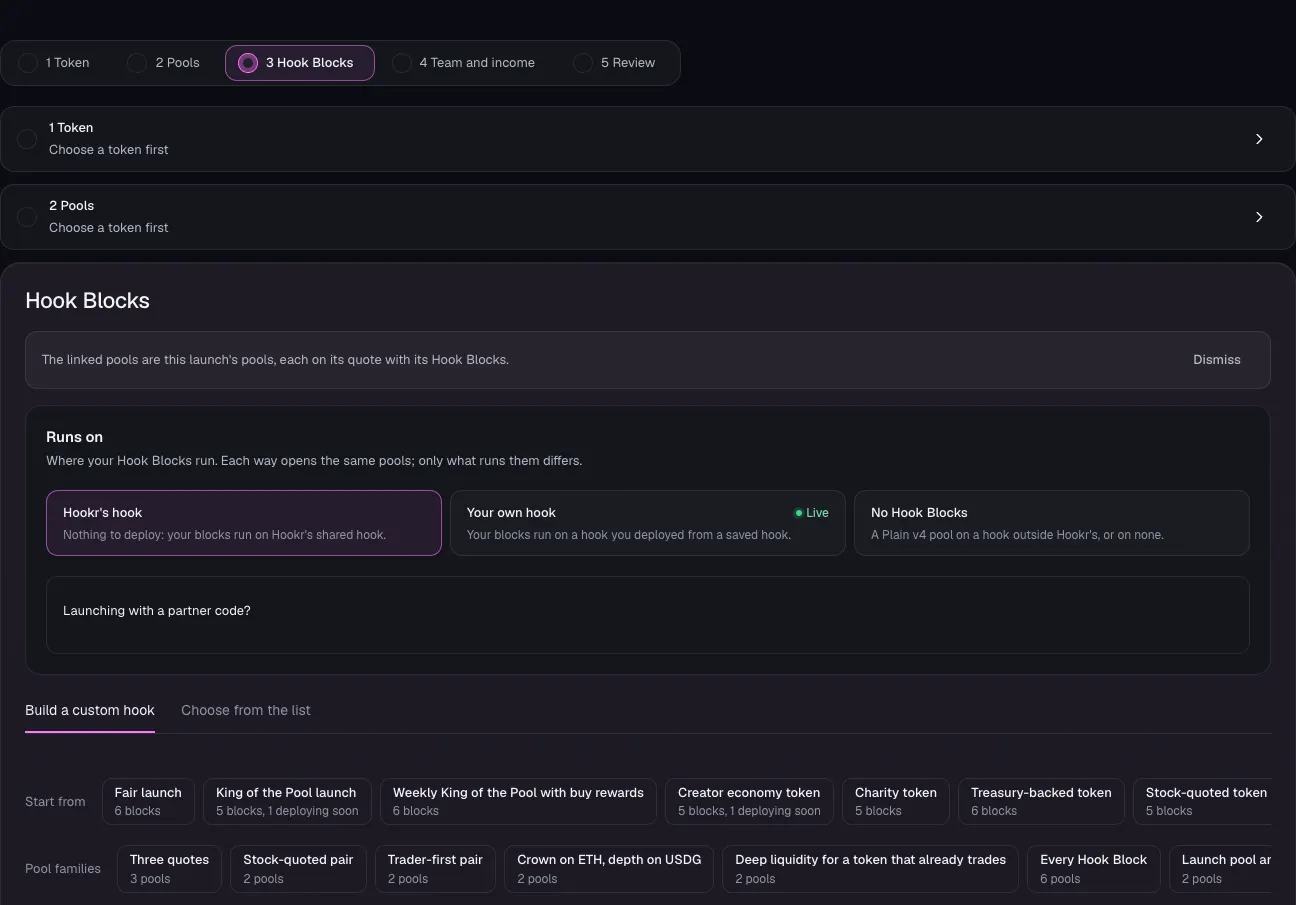
- Check the banner reads: The linked pools are this launch's pools, each on its quote with its Hook Blocks.
- Under Runs on, keep Hookr's hook.
Pick the token that already trades
- Open 1 Token.
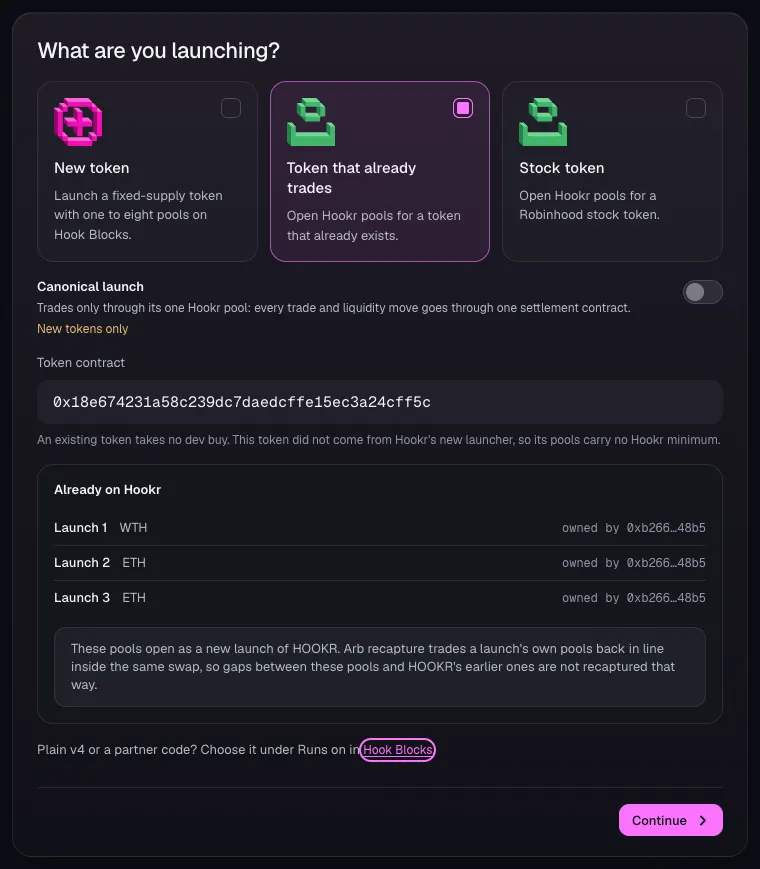
- Under What are you launching?, choose Token that already trades.
- In Token contract, paste your token's address. This example uses HOOKR, 0x18e674231a58c239dc7daedcffe15ec3a24cff5c.
- Check Already on Hookr. It lists the token's earlier Hookr launches, or says these pools are its first launch.
- Click Continue.
Set how the buyback pool opens
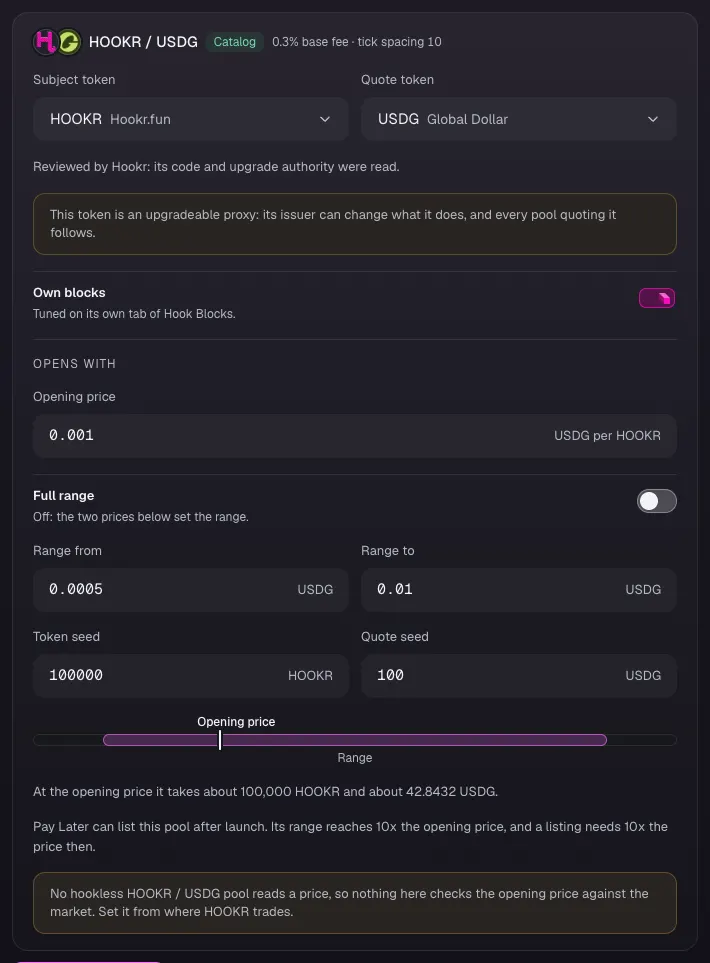
- In 2 Pools, check the card reads HOOKR / USDG, Catalog, 0.3% base fee · tick spacing 10.
- Leave Own blocks on.
- Set Opening price in USDG per token. This example uses 0.001; set it from where your token trades.
- Leave Full range off. Set Range from and Range to. This example uses 0.0005 and 0.01; a Range to of 10x the price keeps Pay Later open.
- Set Token seed and Quote seed. This example uses 100000 and 100; the card shows what the pool takes at the opening price.
- Click Continue.
Check the pool's Hook Blocks
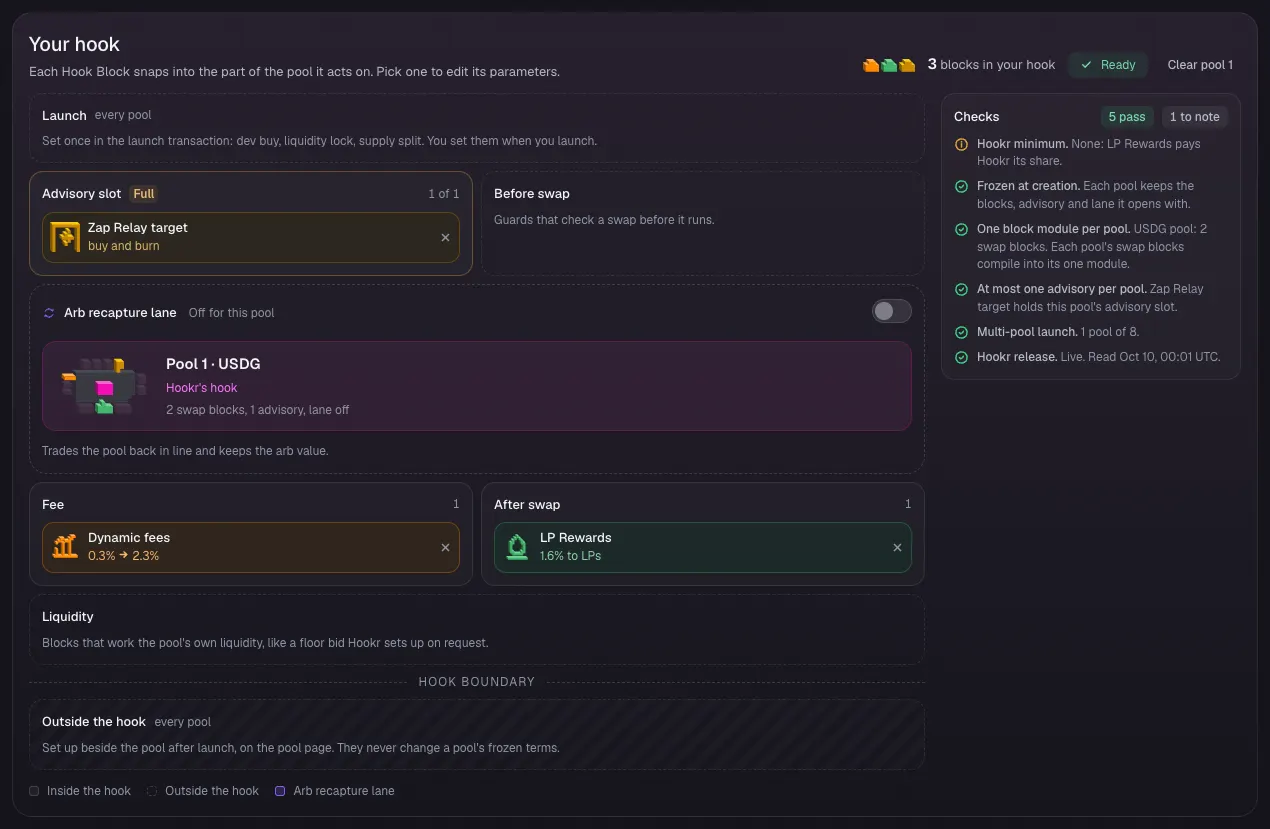
- Open 3 Hook Blocks and scroll to Your hook.
- Check Advisory slot shows Zap Relay target, Fee shows Dynamic fees and After swap shows LP Rewards.
- Check Arb recapture lane reads Off for this pool. A Zap Relay target launches with no arb recapture.
- Check Checks lists nothing to fix.
Set the Zap Relay target
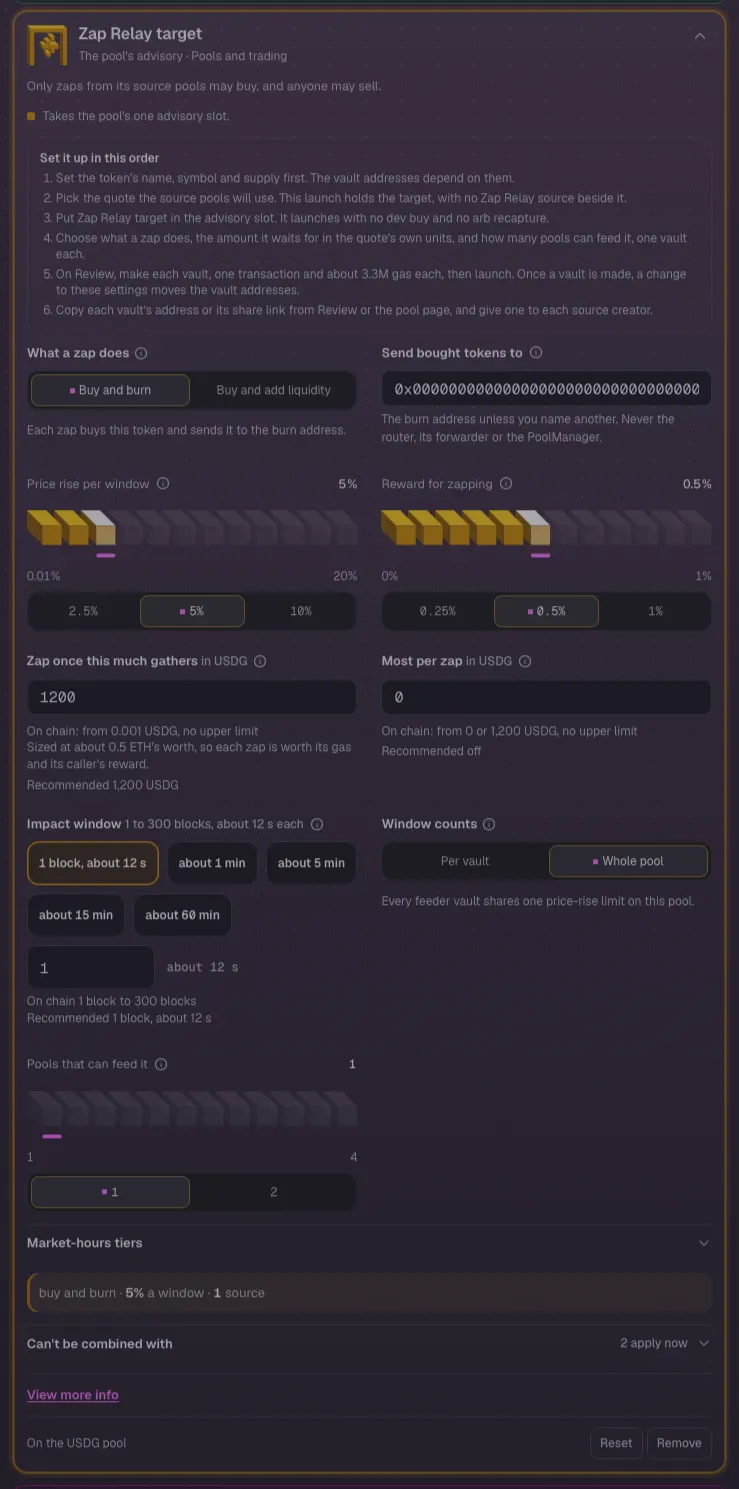
- Click Zap Relay target in the block list to open its settings.
- Under What a zap does, keep Buy and burn, or choose Buy and add liquidity.
- Leave Price rise per window at 5%, Reward for zapping at 0.5%, Zap once this much gathers at 1200 USDG, Impact window at 1 block and Window counts at Whole pool.
- Keep Pools that can feed it at 1, for the feeder launch. Set it up to 4 if more feeders will pay into this pool.
Team and income
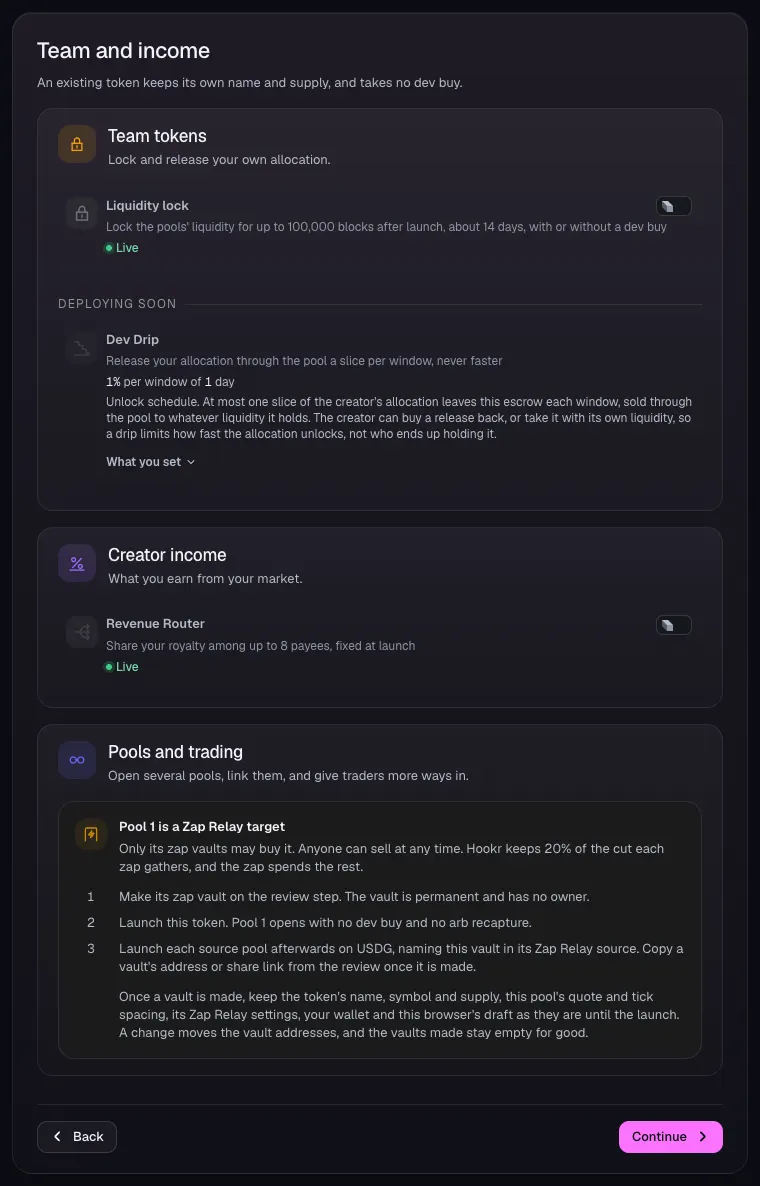
- Open 4 Team and income.
- Leave Liquidity lock and Revenue Router off. This family sets neither.
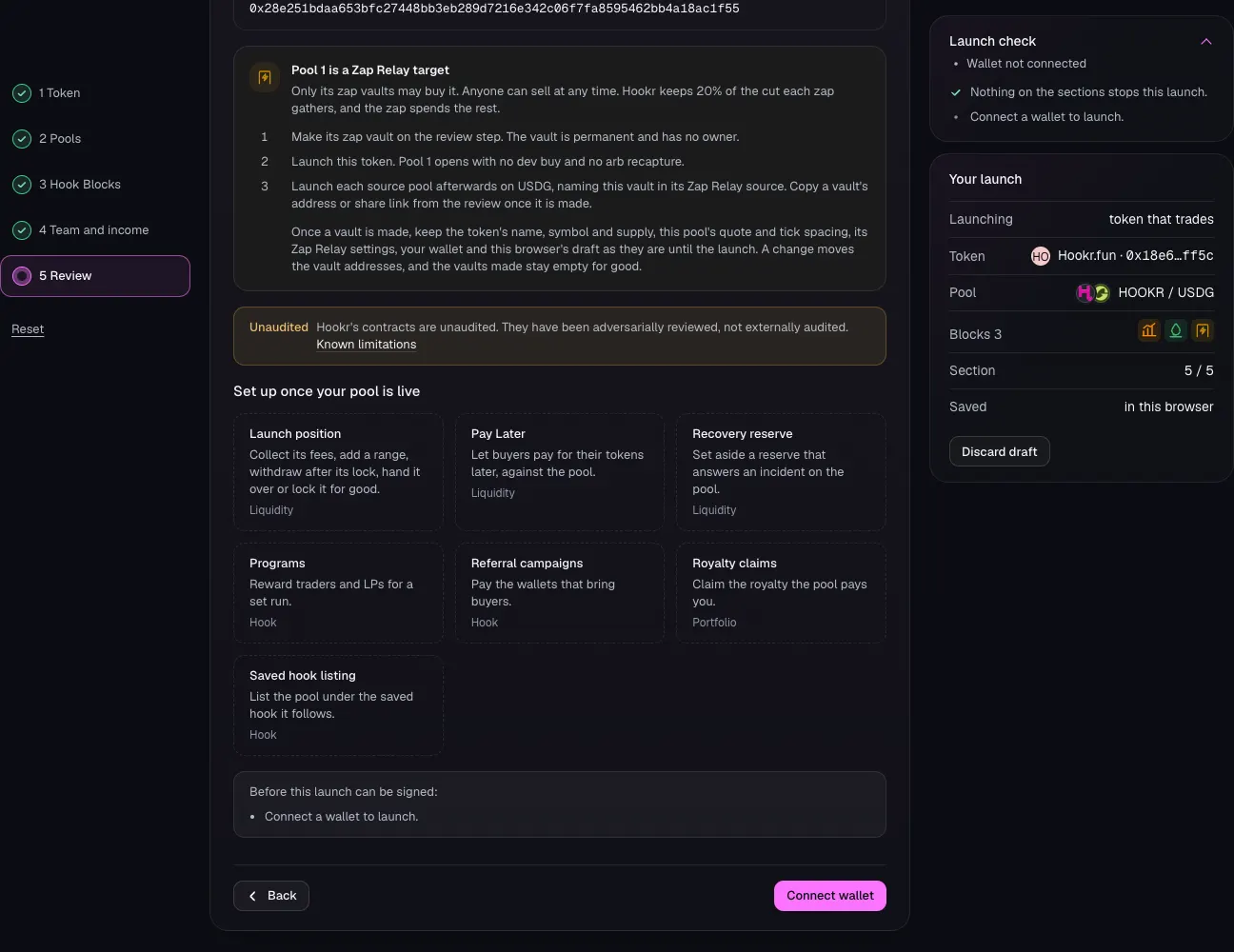
- Read Pool 1 is a Zap Relay target: you make its zap vault on Review, before the launch.
- Click Continue.
Review the buyback pool
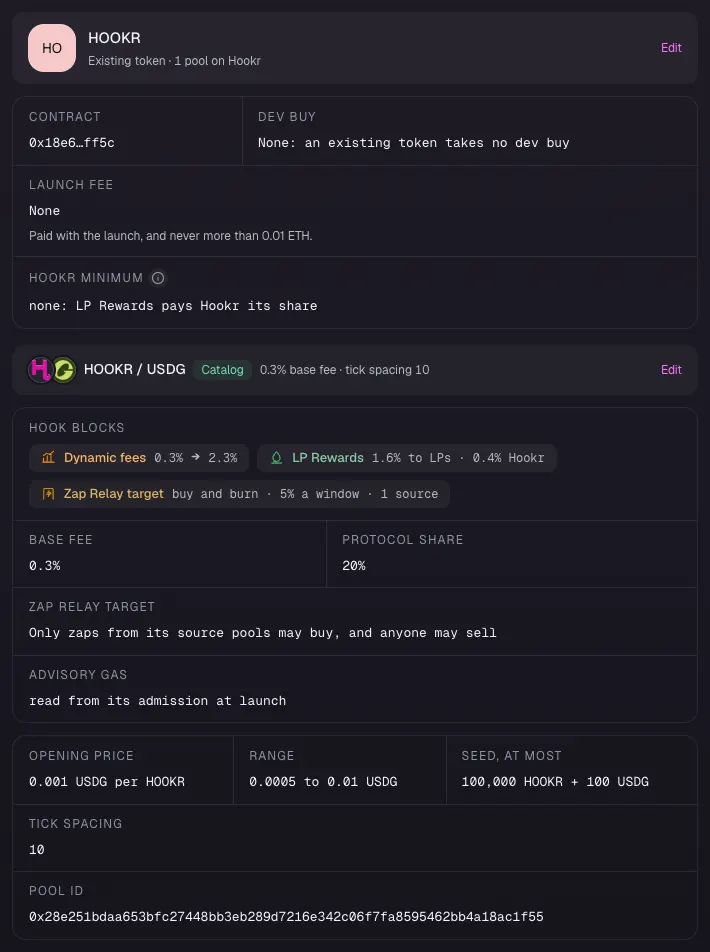
- Open 5 Review.
- Check Hook Blocks lists Dynamic fees, LP Rewards and Zap Relay target, and Tick spacing reads 10.
- Check Opening price, Range and Seed, at most match what you set.
Make the vault, then launch
- Check Launch check reads Nothing on the sections stops this launch.
- Click Connect wallet, make the zap vault on Review, then launch. Each is its own transaction.
- Copy the vault's address from Review or the pool page. The feeder launch needs it.
Full walkthrough: Launch 2: the feeder
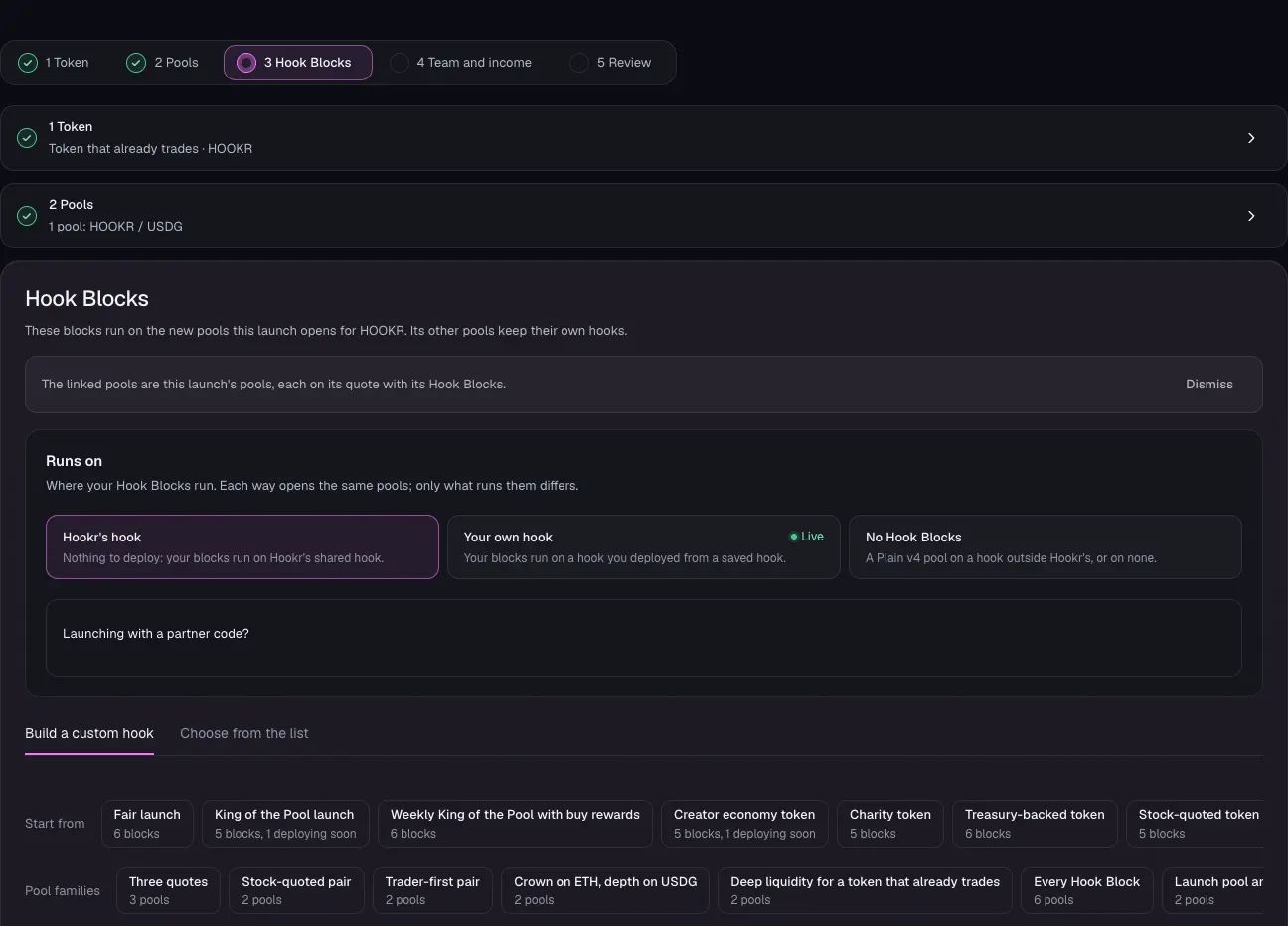
Open the launch page on this family
- Launch the buyback pool first, and keep its vault address.
- Open the launch page on this family.
- Under Runs on, keep Hookr's hook.
Pick the same token
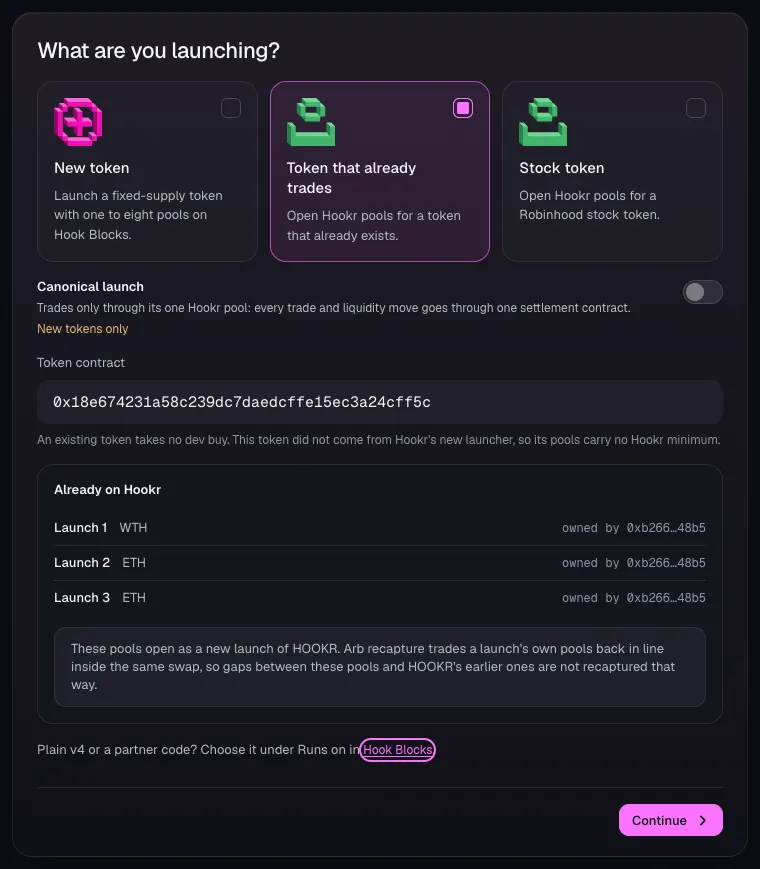
- Open 1 Token and choose Token that already trades.
- In Token contract, paste the same token's address. This example uses HOOKR, 0x18e674231a58c239dc7daedcffe15ec3a24cff5c.
- Click Continue.
Set how the feeder pool opens
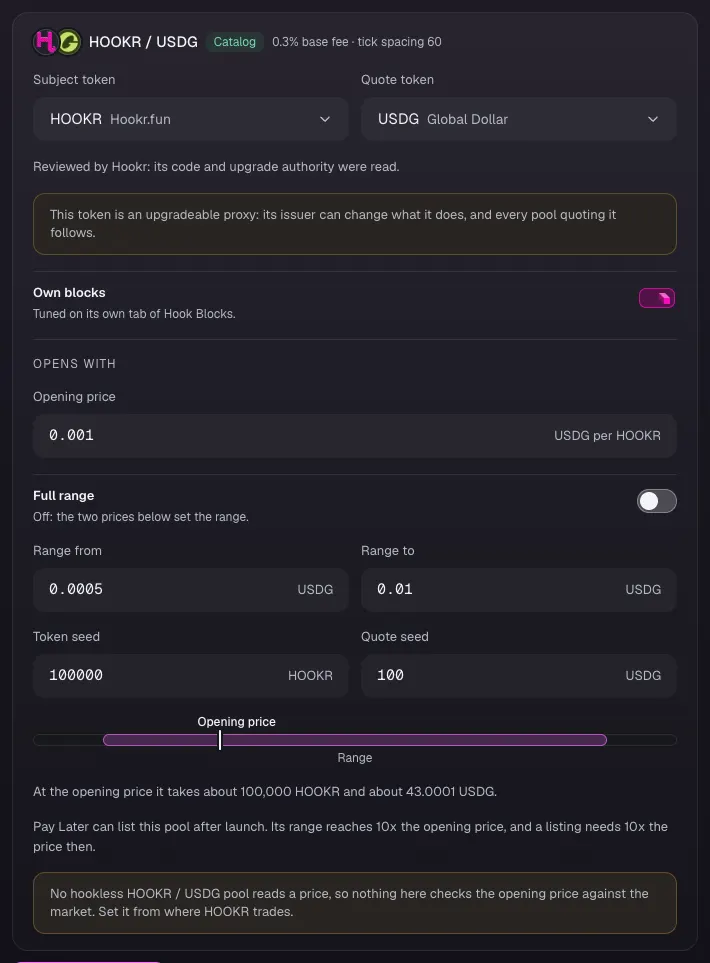
- In 2 Pools, check the card reads HOOKR / USDG, 0.3% base fee · tick spacing 60. The new tick spacing makes it a different pool from the buyback pool.
- Set Opening price, Range from, Range to, Token seed and Quote seed. This example uses 0.001, 0.0005, 0.01, 100000 and 100.
- Click Continue.
Check the pool's Hook Blocks
- Open 3 Hook Blocks and scroll to Your hook.
- Check Advisory slot shows Zap Relay source, Fee shows Dynamic fees and After swap shows LP Rewards.
- Check Arb recapture lane is on: Before and after each swap.
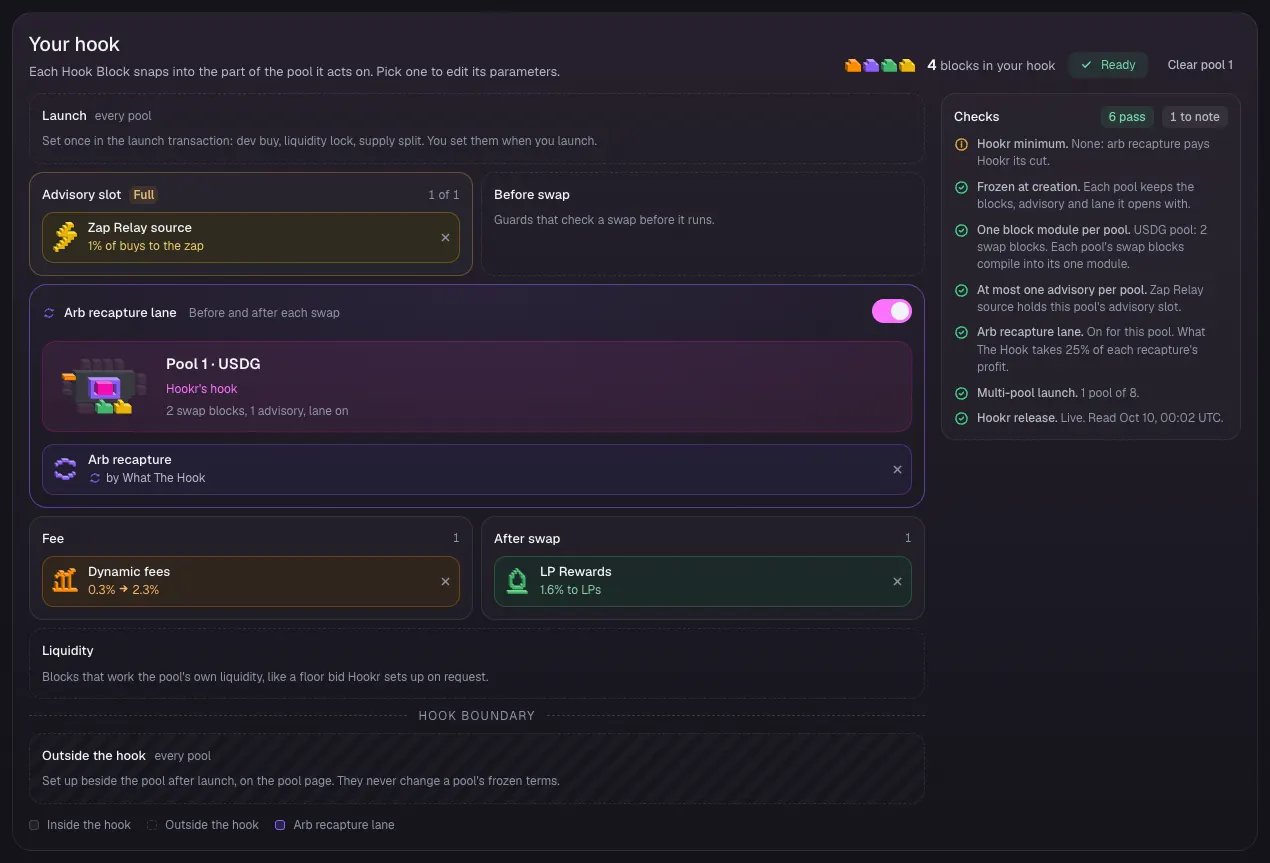
Name the vault in Zap Relay source
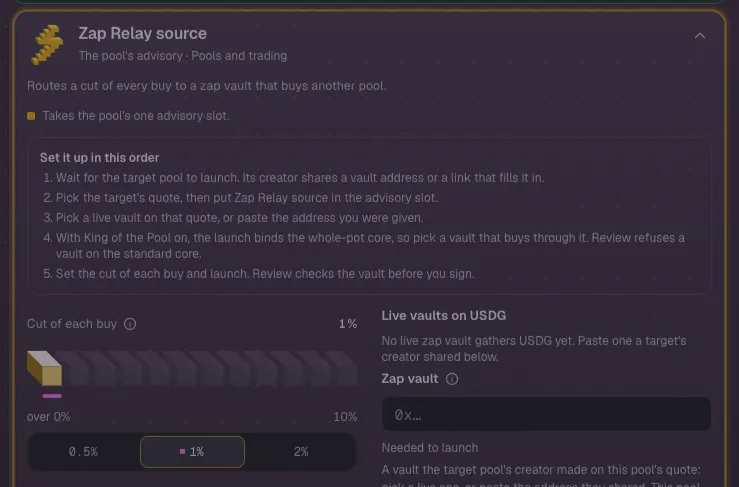
- Click Zap Relay source in the block list to open its settings.
- Leave Cut of each buy at 1%.
- Under Live vaults on USDG, pick the buyback pool's vault once it shows there.
- Or paste the vault address from the target launch's receipt into Zap vault.
- Until a vault is named, Zap vault reads Needed to launch and Checks lists it to fix.
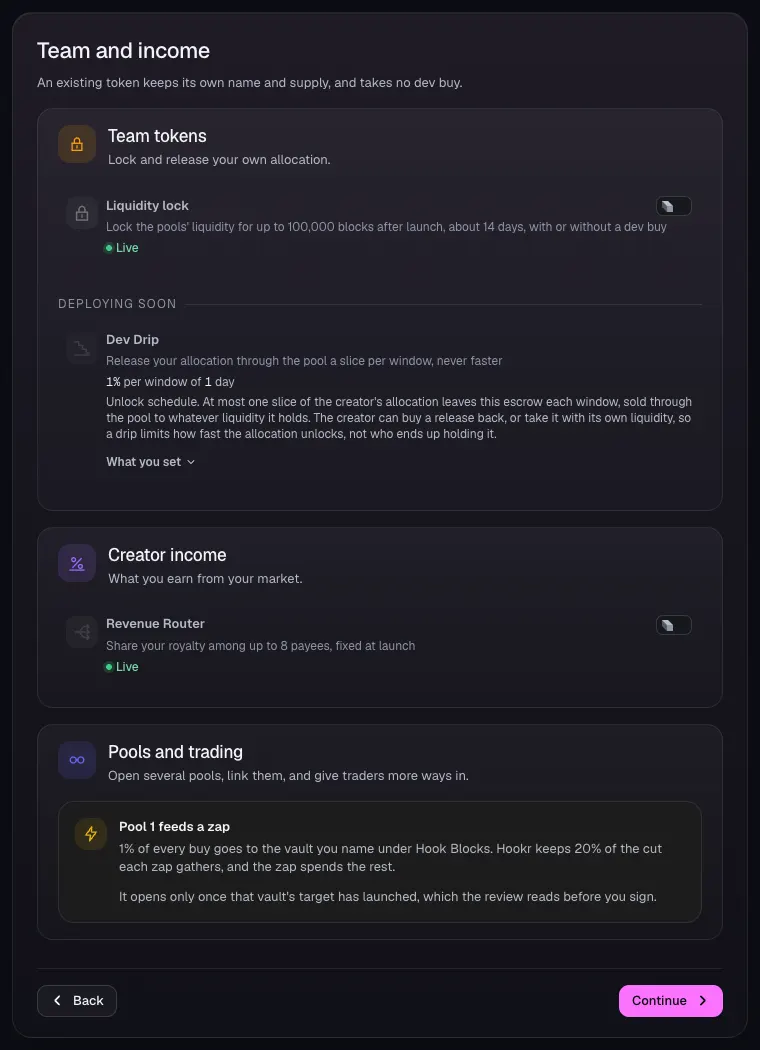
Team and income
- Open 4 Team and income.
- Leave Liquidity lock and Revenue Router off.
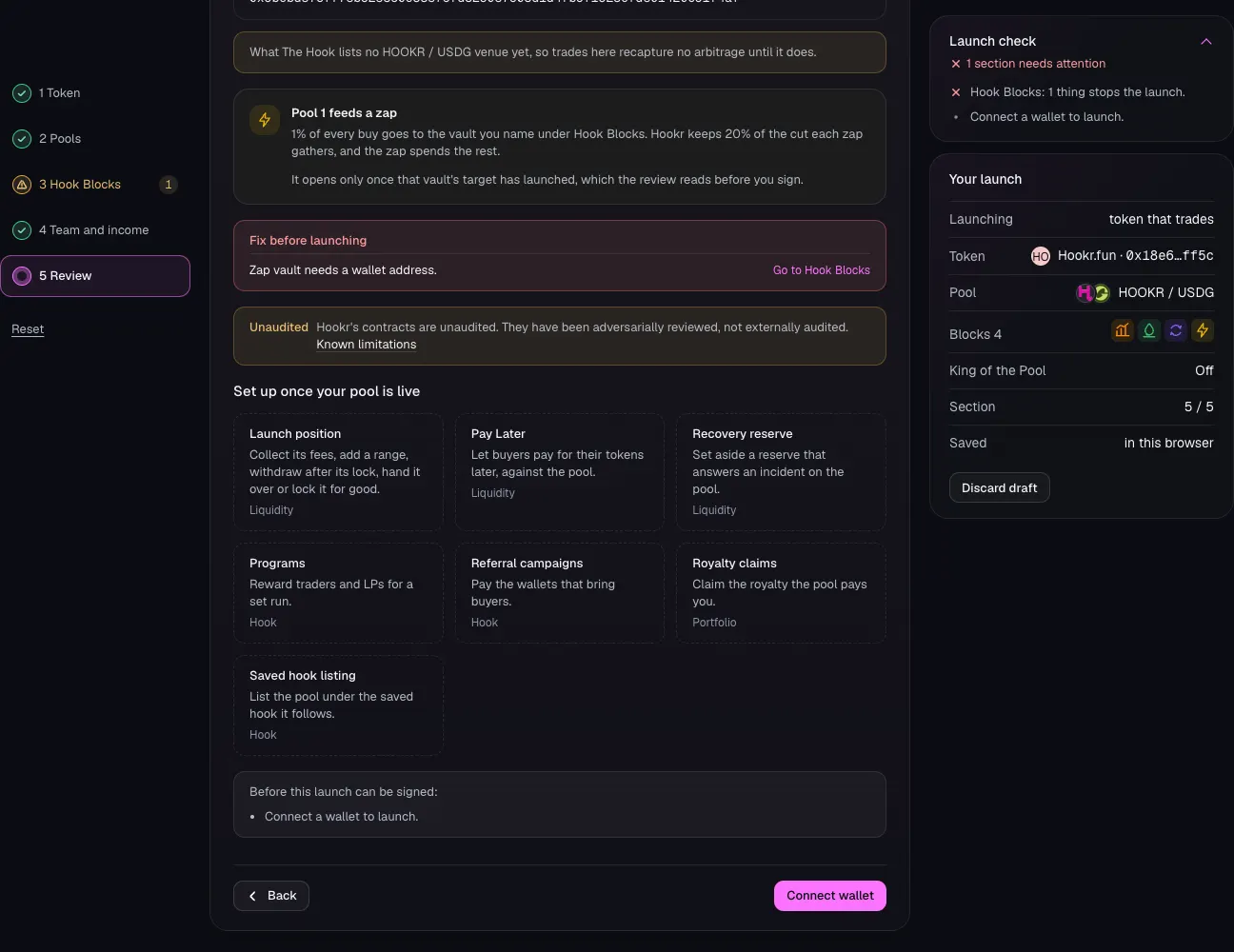
- Read Pool 1 feeds a zap: 1% of every buy goes to the vault you named.
- Click Continue.
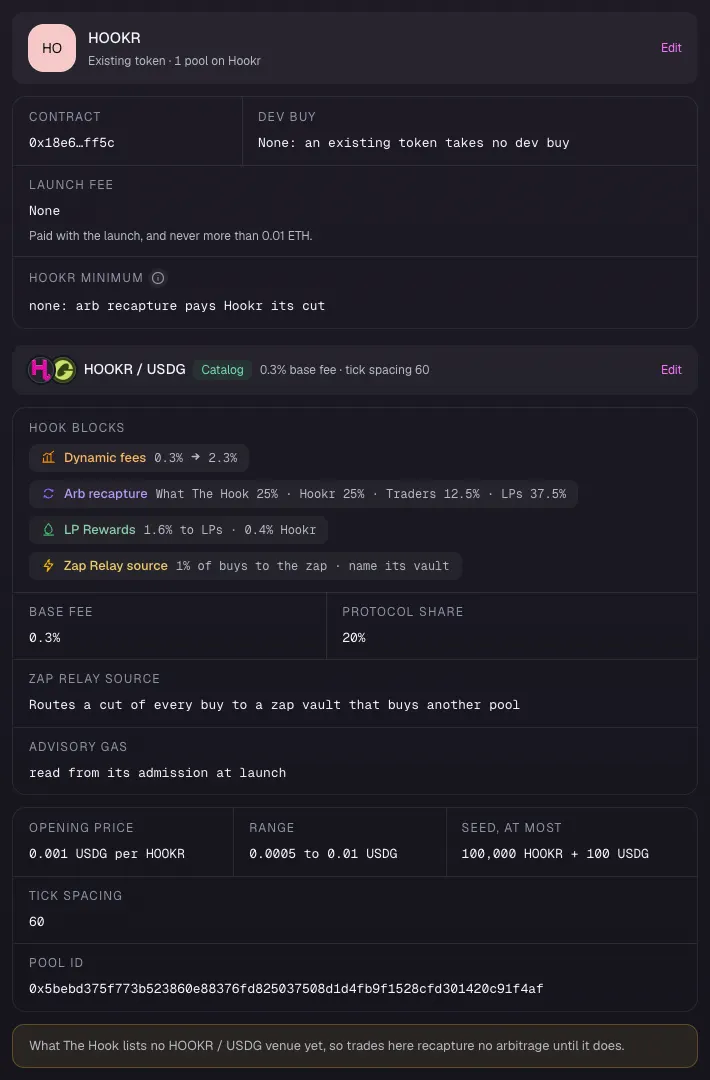
Review the feeder
- Open 5 Review.
- Check Hook Blocks lists Dynamic fees, Arb recapture, LP Rewards and Zap Relay source, and Tick spacing reads 60.
- Read the note under the pool: What The Hook lists no HOOKR / USDG venue yet, so this pool recaptures no arbitrage until it does.
Launch the feeder
- Check Fix before launching is empty. It lists Zap vault until you name the vault.
- Click Connect wallet and launch. Review reads the vault before you sign.